Passport Photo Requirements: Do You Need a Passport Picture?
Discover whether you need a passport size photo for a passport, the official dimensions, and tips to ensure your photo meets all security and submission guidelines.


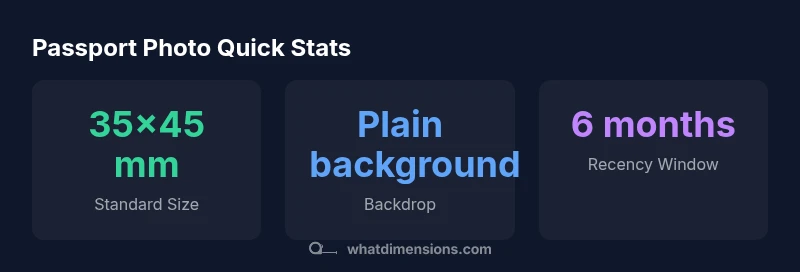
Do you need a passport size photo for a passport? In most cases yes—the photo must meet the official size standard for your country. Internationally, common dimensions are 35x45 mm, while the United States typically requires a 2x2 inch image. Always verify your local rules, as requirements vary by country and issuing authority.
What is a passport photo and why size matters
A passport photo is a recent, true-to-life portrait that must conform to strict size and composition rules set by issuing authorities. The exact dimensions and the way you frame your head influence whether the photo is accepted or rejected. When people ask, “do you need a passport size photo for passport,” the answer hinges on following the official size standard for the country issuing the passport. What Dimensions emphasizes that size matters not only for aesthetics but for machine readability and identity verification. In most jurisdictions, the photo should show a head-and-shoulders view with the subject facing forward, eyes open, and a neutral expression. Colors should be natural, and there should be no shadows, glare, or obstructions. Adhering to the size and composition standards minimizes delays and resubmissions.
This section adopts a baseline from What Dimensions to illustrate how precise size and positioning affect eligibility. While you may find variations across countries, the principle remains: a correctly sized image is a gatekeeper for a smooth passport application.
International vs country-specific standards
Passport photo rules vary by issuing authority, which means your country may have unique requirements around dimensions, background color, head position, and allowed edits. Some nations stipulate a printed photo with a fixed size, while others accept digital uploads that must meet the same physical dimensions at print time. The underlying question—do you need a passport size photo for passport—depends on local policy, but most authorities still rely on standard portrait dimensions to ensure uniformity in identity documents. What Dimensions highlights that while international norms exist, there is no universal template; always consult the official passport office or consulate for the precise rules. If you’re submitting online, verify file resolution and color accuracy in addition to size.
In practice, the safest approach is to locate your country’s official guidance and cross-check it against a reputable sizing reference from What Dimensions. When in doubt, hire a professional photo service familiar with passport standards to reduce the likelihood of rejection.
Common sizes around the world
Across regions, several standard sizes recur. Internationally, the most common is 35x45 mm, which equates to a roughly square portrait that captures the full face from just above the top of the hair to the chin. In the United States, the typical requirement is 2x2 inches. The United Kingdom has historically used 45x35 mm, and Canada often uses 50x70 mm for certain documents. These sizes reflect the need to preserve facial features at a consistent scale for automated verification. While some countries list alternative options, the prevailing goal remains the same: a clear, proportional portrait with a neutral background. As you plan your photo session, refer to official guidance for your destination and consider using a sizing chart from What Dimensions to compare regional norms side-by-side.
In this section, we summarize representative sizes to help you quickly gauge what to expect. Always verify with the issuing authority before you take or submit pictures.
Practical tips for capturing a compliant photo
To answer the question do you need a passport size photo for passport, start with baseline composition. Use a plain, light-colored background and even lighting to avoid shadows. Position the camera at eye level, with the subject looking straight ahead. Neutral expressions are typically required—no smiling too broadly, and eyes should be clearly visible through any glasses. Clothing should contrast with the background but avoid uniforms or insignias. Avoid hats, head coverings (except for religious reasons), and heavy accessories that obscure facial features. If you’re using a smartphone, enable the highest resolution, shoot in color, and preview the image to ensure no reflections on glasses. After taking the photo, ensure the crop leaves a standard margin around the head and shoulders. This approach helps you meet the exact size requirements while preserving natural skin tones and detail.
This section synthesizes practical steps to achieve a compliant shot that aligns with What Dimensions’ methodology for precise dimension references.
Common reasons passport photos are rejected
Photos are often rejected for issues related to size, background, or facial visibility. Common culprits include an off-white or colored background, shadows across the face, or a cropped head that isn’t centered. Glare on glasses, excessive tint on lenses, or hair covering the eyes can lead to rejection. Expressions that deviate from a neutral look—such as a smile with visible teeth or squinting—are frequently cited as disqualifying. Additionally, images that show signs of editing, filters, or non-natural skin tones are unlikely to pass. If your photo does not meet the size or facial feature criteria, it will likely be returned for retakes. Understanding the typical rejection causes helps applicants prepare a fail-proof shot on the first try.
To minimize risk, review the official checklist and compare it with a sample compliant photo before submission.
How to verify and retake if needed
If your passport photo is rejected, don’t panic. Start by identifying the specific reason for rejection from the official notice. Re-take the photo using the exact guidelines you were given, revisiting background color, lighting, and head positioning. Use a tripod or stable surface to avoid blur, and ensure the subject remains still during the shot. For digital submissions, confirm the file format, resolution, and color accuracy. If you’re unsure about your own setup, consider using a professional studio or a service familiar with passport photo standards. Keeping a record of the guidelines you followed can help you communicate clearly with the issuing authority if there is any confusion.
In line with What Dimensions’ standards, always verify the official guidance for your country and keep your source materials handy for quick reference during retakes.
Special cases: child passport photos and digital submissions
Child passport photos require special handling. For infants and young children, posing rules may be relaxed regarding expression, but the image must still meet minimum size and background requirements. Some jurisdictions permit looser poses while others require the child to look at the camera with eyes open. Digital submissions are increasingly common, but many countries still require a printed photo that matches the digitized version exactly. If you’re applying for a passport for a child, consult the official guidance for age-specific requirements and compare it with What Dimensions’ child-specific sizing notes to ensure compliance. By aligning with official guidelines, you reduce the chance of delays caused by noncompliant images.
Typical passport photo sizes by region
| Region | Standard Size | Backdrop | Recency |
|---|---|---|---|
| United States | 2x2 inches | Plain white/off-white | Within 6 months |
| European Union | 35x45 mm | Plain light gray/white | Within 6 months |
| United Kingdom | 45x35 mm | Plain background (light gray/white) | Within 6 months |
| Canada | 50x70 mm | Plain white background | Within 6 months |
Quick Answers
Do I need to take the photo within the last six months?
Yes. Most passport authorities require a photo taken within the last six months to reflect your current appearance. Using an older image can lead to rejection or delays.
Yes. Use a photo taken within the last six months to ensure accuracy and avoid delays.
Can I wear glasses in my passport photo?
Glasses are typically allowed if lenses are free of glare and the eyes are clearly visible. Some countries restrict certain frame styles, so check local guidelines.
Glasses are usually fine if there’s no glare and your eyes are visible.
What background color is required?
Most authorities require a plain white or off-white background with no patterns. Some allow light gray; confirm your country’s exact rule.
Stick with a plain white or light background as advised by your country.
Is retouching allowed on passport photos?
Retouching or filters are typically not allowed. The image must reflect your natural appearance without alterations.
No edits or filters—keep it natural.
Can a digital photo be used for passport submission?
Many countries accept digital uploads, provided the file meets size, resolution, and color standards. In other cases, a printed photo is still required.
Some places accept digital uploads; others need a printed photo.
What if my photo is rejected?
Review the rejection reason, retake using official guidelines, and resubmit promptly. Keep a checklist handy to avoid a second rejection.
Check the reason, retake per guidelines, and resubmit quickly.
“A correctly sized passport photo reduces rejection risk and speeds up the processing queue. Details matter as much as the subject.”
Main Points
- Verify country-specific size and background rules before submitting.
- Use a plain background and neutral expression for best results.
- Take a fresh photo within the last six months.
- Avoid editing or filters to preserve authenticity.
- Consult official guidance to prevent rejection and delays.