Compare Phone Dimensions: A Practical Guide to Size and Fit
A thorough, evidence-based comparison of phone dimensions to help you choose models that fit your pockets, hands, and accessories. Learn how to measure, read specs, and apply dimension data in real-world scenarios.


To choose a phone, start by comparing core measurements: length, width, and thickness in millimeters, plus weight. A quick side-by-side helps evaluate pocketability, grip, and case compatibility. When dimensions are close, prioritize practical factors such as battery life, camera placement, and durability to decide which model fits your daily routine.
Why precise phone dimensions matter
For homeowners, students, designers, and shoppers who need exact size specs, phone dimensions matter more than you might expect. Tiny differences in length, width, or thickness can change how a device feels in your hand, how it fits in a pocket, or whether a case or holster actually closes properly. According to What Dimensions, the practical impact of dimensions extends beyond mere lines in a spec sheet; it shapes everyday usability, accessibility, and even the way a phone sits in mounts or car docks. In an era of slim bezels and curved corners, the quest for precision becomes a design constraint and a shopping guardrail. When you compare models, you’re not just counting millimeters—you’re estimating real-world behavior: how easily you can reach the top corners with one hand, whether the phone slides out of your pocket during a commute, and if the device sits flat on a desk without wobbling. The What Dimensions team emphasizes that exact measurements help translate marketing blurbs into tangible outcomes, such as comfortable grip, predictable accessory fit, and reliable ergonomics. This section lays the groundwork for a disciplined approach to measurement that reduces buyer remorse and accelerates confident decisions.
How dimensions influence daily use
Dimensions in themselves are not destiny, but they strongly influence daily handling and compatibility. A compact length and narrow width typically improve one-handed reach and pocketability, while extra thickness can reduce ease of insertion into tight jeans or athletic wear. Weight distribution matters too: a device that is slightly taller but lighter can feel less cumbersome than a heavier, bulkier model. The What Dimensions analysis shows that many users underestimate how minor dimensional changes affect grip, button access, and screen visibility when held at arm’s length. Accessory compatibility is another major factor: a phone with unusual width or a curved edge may cause cases, screen protectors, or car mounts to fit inconsistently. If you rely on gadgets like camera grips or docking stations, precise dimensions ensure a secure fit and minimize wobble. Consider your typical environment—pocket, bag, desk, or car—because the same model may feel markedly different across contexts. A data-driven approach to measuring and comparing dimensions helps you select a phone that aligns with your lifestyle and ergonomic preferences.
Primary measurements to compare
When you embark on a side-by-side assessment, start with the core three measurements: length, width, and thickness. These are the baseline that determines how a phone sits in your hand and pocket. Add weight to gauge how a device feels after a full day of use. Beyond these basics, consider the display-related metrics, such as screen size and aspect ratio, which influence perceived footprint and usability on a daily basis. Camera protrusion, often reported as a “camera bump” height, is a practical dimension to watch because it can affect how the phone rests on flat surfaces and whether it tilts in a protective case. Battery capacity and form factor can indirectly influence dimensions when battery packs vary between models. Finally, note enclosure geometry—rounded corners, curved edges, and bevels—that can alter the effective footprint in real use. By standardizing how you read dimensions (mm for each axis, weight in grams), you create a repeatable framework that makes comparisons meaningful rather than cosmetic.
Practical measuring methods
Accurate measurement begins with a calibrated, repeatable approach. Use a precise ruler or caliper to measure length (top-to-bottom), width (side-to-side), and thickness at multiple locations to account for curvature. Record the maximum and average values to reflect manufacturing tolerances. When possible, measure the device in its official configuration (screen on, case on, with or without camera lens protection) as dimensions can vary with accessories. Log weight using a digital scale, ideally after a brief rest to stabilize the device. If you have access to multiple models, replicate the measurement protocol across all devices to ensure comparability. For accessories like cases, screen protectors, and mounts, gather the product’s declared inner dimensions and compare them against your phone’s measurements, noting tolerance ranges. Finally, translate measurements into everyday decisions: will this phone fit your pocket, your hand’s reach, and your preferred case or mount without forcing, bending, or misalignment?
Case fit and accessory considerations
Accessories are often the hidden gatekeepers of dimension-based decisions. A phone that is only slightly larger than a competitor may still require a different case size or a unique car mount because of a camera bump, slot position, or port layout. Before buying, examine the design specifics of your desired accessories: cases with raised bezels, screen protectors that cover curved edges, and mounting brackets with nonstandard latch dimensions. If you frequently switch pockets or bags, test whether the device slides out in motion and whether additional bulk from a rugged case offset the size advantage. For those who use wireless charging docks, verify that the device’s thickness or back curvature doesn’t prevent proper alignment. When ordering online, review the return policy and ensure you can verify fit in real life. Remember that dimension data is a guide; the ultimate test is how well the phone integrates with your day-to-day routines and accessory ecosystem.
Ergonomics and hand feel at different sizes
Ergonomics often polarizes users: some people prefer ultra-compact devices for one-handed use, while others want larger screens for productivity and media consumption. The size-to-hand relationship is influenced by hand width, finger length, and grip preference. A model that measures 7.0–7.4 mm thick can feel distinctly different from one at 8.0–8.5 mm, even if the overall footprint looks similar. In addition to dimensions, consider weight distribution: a lighter device with a taller profile can still feel balanced if the weight is centered along the spine. Conversely, a heavier model with a similar footprint may feel top-heavy and harder to maneuver. To assess ergonomics, try holding different models at arm’s length, typing with one hand, and performing common tasks such as reaching the top of the screen and taking a photo without shifting grip. If possible, test both tall and wide configurations to understand how grip width and edge curvature interact with your natural hand position.
Real-world sizing scenarios
Different usage scenarios highlight how dimensions translate into practical outcomes. For a student who carries a phone in a tight backpack pocket, a compact or mid-sized device may be ideal for quick access and one-handed navigation. For a professional who uses split-screen apps and long reading sessions, a larger display offers comfort but requires a sturdier pocket and reliable grip. A parent managing multiple devices might prioritize a model that fits easily into a car console or a stroller pocket. The key is to map your daily routes, pockets, and accessory habits to a dimension profile. Create a simple decision rubric: pocketability score, one-handed reach score, accessory compatibility score, and daily usability score. Then rate each model against these criteria. This practical framework helps you see beyond the marketing blurbs and focus on what dimensions actually mean in your life.
How to interpret a side-by-side table
When you encounter a side-by-side table, start by checking the total footprint: compare length and width to judge the overall space the phone occupies. Then consider thickness and weight to assess heft and balance. If one model is fractionally taller but lighter, it may still feel easier to hold in daily tasks; the perception of weight can differ from raw mass. Look at display metrics only as context for the device’s footprint, not as a standalone determinant of usability. Camera placement and sensor modules can alter the true edge-to-edge dimensions, affecting how a phone sits in a case or on a flat surface. Finally, synthesize all data into your personal priorities: pocketability, one-handed reach, accessory fit, and comfort during extended use. A well-constructed side-by-side makes these trade-offs transparent and actionable.
Limitations of dimensions in predicting usability
Dimensions are a critical input, but they do not capture every usability dynamic. Materials, edge curvature, button placement, and heat management influence the real-world experience just as much as measurements do. A device with near-equal inches can feel very different due to weight distribution and grip texture. Similarly, a phone that is slightly larger may fit easily in your hand if it is lighter or better balanced. For accessibility and ergonomics, user-specific factors such as hand size, dexterity, and personal preferences matter as much as machine measurements. Always pair dimension data with hands-on testing or user reviews when possible. Recognize that a model’s dimensions are a guide to fit and comfort, not a guarantee of performance or usability across all contexts.
How to use dimensions in design and planning
If you design cases, mounts, or UI layouts, precise phone dimensions inform tolerances and interaction zones. Start with a standardized measurement protocol and document the largest and smallest tolerances observed across devices. Use this data to design scalable accessories that accommodate minor variation in width, thickness, and camera protrusion. In app design, dimension data helps you plan safe touch targets and layout margins that scale with different aspect ratios and device heights. For students and designers, building a reference library of typical device dimensions across generations helps anticipate future needs and reduces redesign cycles. Over time, you’ll identify a credible set of baseline measurements that keep your accessories compatible with a broad range of phones while maintaining a premium user experience.
Comparison
| Feature | Phone A | Phone B |
|---|---|---|
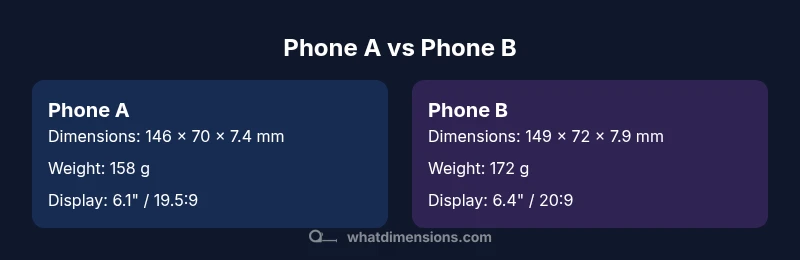
| Dimensions (L x W x D, mm) | 146 x 70 x 7.4 | 149 x 72 x 7.9 |
| Weight (g) | 158 g | 172 g |
| Display size / aspect | 6.1" / 19.5:9 | 6.4" / 20:9 |
| Battery capacity (typical) | 3200–3400 mAh | 3600–3800 mAh |
| Best for | Compact-hand use | Balanced performance with better screen |
Strengths
- Helps you pick models that fit pockets and cases
- Improves confidence when comparing accessories and mounts
- Reduces post-purchase disappointment from size surprises
- Encourages ergonomic considerations early in the buying process
The Bad
- Dimensions alone can't predict usability or battery life
- Measurement conventions vary by manufacturer
- Small dimensional differences can be negligible in real-world use
- Time spent measuring can delay decision-making
Choose the model that best aligns with your daily carry and grip preferences.
If pocketability and one-handed use matter most, lean toward the more compact option. If you value display size and endurance, prioritize the larger model. The What Dimensions team emphasizes using a side-by-side of core measurements to guide your decision and verify accessory compatibility.
Quick Answers
What exact measurements should I compare when evaluating phone dimensions?
Focus on length, width, thickness, and weight as the core metrics. Also consider display size and aspect ratio for context. These measurements collectively influence grip, pocketability, and fit with accessories.
Compare length, width, thickness, and weight; add display size for context to understand how a phone will feel and fit in daily use.
Do phone dimensions vary by measurement standards?
Yes. Manufacturers may measure from different reference points (excluding or including camera bumps) and apply tolerances. Always check the official spec sheet for the precise measurement conventions used by the brand.
Measurements can vary by how manufacturers define them; check the brand’s official specs for exact standards.
How much difference in mm matters for pocketability?
Even small millimeter differences can affect pocket fit, especially in tight pockets or compact pockets. Test in real scenarios when possible.
Small mm changes can affect pocketability; test with your usual clothing to be sure.
Are thickness measurements reliable for comparing phones?
Thickness matters, but camera protrusion and back curvature can alter how the device sits on a surface. Consider all dimensional factors together.
Thickness is important, but don’t ignore camera bump and back shape when evaluating usability.
Can dimensions predict ergonomics?
Dimensions help, but ergonomics also depend on hand size, grip style, and weight distribution. Use them as part of a broader usability assessment.
Dimensions aid ergonomics, but your hand size and grip matter too. Use them together.
How should I measure a phone at home?
Use a precise ruler or caliper to measure length, width, and thickness at multiple points. Record ranges and repeat with different models for consistency.
Measure with precision tools, note ranges, and compare models using the same method.
Main Points
- Compare length, width, and thickness first
- Account for weight to understand hand feel
- Check case and accessory compatibility before buying
- Use side-by-side tables to simplify decisions
- Remember dimensions are a guide, not a guarantee of usability