Dimensions of a Phone: A Precise Size Guide for 2026
Explore the dimensions of a phone with precise measurements, including height, width, depth, and diagonal screen size. Learn how these specs affect ergonomics, cases, pockets, and accessories in 2026.


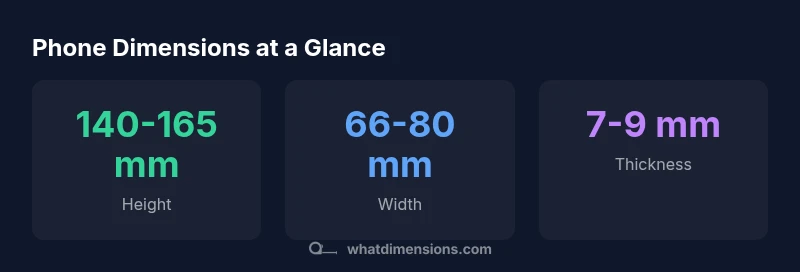
The dimensions of a smartphone typically fall within a narrow band that balances grip, display, and battery needs. A modern phone is usually around 140–165 mm tall, 65–80 mm wide, and 7–9 mm thick, with diagonal screens measuring about 5.5–7.0 inches. For precise fits, measure height, width, depth, and the screen diagonal.
Why dimensions matter for everyday decisions
Dimensions of a phone determine how it fits in your hand, pocket, and bag. The What Dimensions team emphasizes that accurate size references help shoppers avoid awkward fits for pockets and cases. Even modest shifts in height or width can change grip comfort, one-handed usability, and how a device sits on a desk. By understanding the four core measurements—height, width, depth, and diagonal display—you can compare models with confidence and choose accessories that truly fit. This practical framing keeps you focused on real-world usability, not just marketing specs.
Defining core measurements: height, width, depth, and diagonal
To compare phones reliably, you must separate the four base measurements: height (vertical dimension), width (horizontal dimension), depth (thickness), and the display diagonal. Height and width determine the footprint seen in pockets and on desks; depth affects pocketability and how snug a case sits; diagonal is the measured screen size, not the device footprint. There is a common confusion between screen size and device footprint; the diagonal is measured across the display surface. The aspect ratio influences perceived size: a device with a long height but narrow width may feel compact in your hand even if the diagonal is large. When listing specs, manufacturers often use rounded values, illustrated as height × width × depth. The most precise approach is to measure with a caliper or a digital ruler placed against the device's corners, or rely on the manufacturer’s official dimensions. This combination helps you assess fit for cases, drawers, and standard accessories.
How to measure a phone accurately at home
Measuring a phone precisely requires careful technique. Start with height and width on a flat surface using a steel ruler or caliper. Align the bottom edge with the ruler, then read the measurement at the topmost point for height. For width, measure from left to right at the widest point, not at a curved corner. Depth is best measured at the thickest section, usually near the camera module or center of the device. If your device has a curved back, measure depth at multiple points to capture the maximum thickness. The diagonal screen size is the most technical metric: measure from one corner of the display surface to the opposite corner, following the screen area (not the bezel). If the device has a camera bump, include the bump in depth, as most manufacturers list overall depth. Record measurements in both millimeters and inches for versatility, and cross-check against official specs to confirm accuracy.
Typical dimension ranges across common phone classes
Phones fall into three broad classes: compact, mid-size, and phablet. Compact phones typically stand 140–145 mm tall and 66–70 mm wide, with a thickness around 7.0–7.5 mm and a diagonal of 5.5–5.8 inches. Mid-size devices measure about 145–150 mm in height, 68–72 mm in width, 7.2–8.0 mm in thickness, and 5.8–6.3 inches diagonally. Phablets top out around 150–165 mm tall, 72–80 mm wide, 7.6–9.0 mm thick, with diagonals spanning 6.1–6.9 inches. These ranges reflect ongoing design trends toward larger screens while attempting to retain comfortable one-handed use; there is considerable variation within each class due to curvature, camera modules, and bezel size.
The impact of aspect ratio and bezel on perceived size
Perceived size is influenced by aspect ratio and bezel thickness. A device with a tall height but wide width can feel bulky, even if the diagonal is similar to a narrower device. Bezel reduction often increases screen area without drastically changing the device footprint, which can improve the perceived size of the display without making the phone harder to hold. Conversely, a wide device with slim bezels may feel more comfortable in the hand than a taller device with a similar display diagonal. When shopping, pay attention to both the absolute numbers and the feel in your hand. A slightly different ratio can significantly affect ergonomics and day-to-day usability.
How dimensions influence accessories: cases, sleeves, pockets
Accessories are dimension-sensitive. A case that is too snug will restrict button access or camera operation, while an oversized case may bulk up the device and reduce pocketability. When selecting a case, verify the internal height, width, and depth specifications, and compare them to your device's official measurements. Don’t forget about camera protrusions—some cases require extra clearance to prevent camera obscuration. Pockets and sleeves also have size constraints; a phone with a deeper thickness can be harder to slide in and out, especially in tight jeans or jacket pockets. Always confirm the device’s exact footprint before buying snug-fitting accessories, and consider a slightly larger protective case if you frequently interface with cables or mounting docks.
Ergonomics and handling: grip comfort vs screen size trade-offs
Human factors drive much of modern phone design. A larger screen improves readability and multitasking but can reduce one-handed usability. Designers often balance height and width to preserve a secure grip, sometimes by adding curved edges or slightly rounded corners that feel smaller in the hand. If your priority is portability, aim for a device at the lower end of the height and width ranges with a manageable thickness. For more immersive experiences, a bigger diagonal with a comparable footprint can be acceptable if you value screen real estate. Try holding different sizes in-store to gauge comfort, and consider grip texture and weight distribution as part of the overall experience.
Case study: comparing three models (generic) on dimensions
Model A is compact: 142 mm tall, 66 mm wide, 7.0 mm thick, 5.5 inch display. Model B is mid-size: 152 mm tall, 70 mm wide, 7.5 mm thick, 6.1 inch display. Model C is phablet-like: 164 mm tall, 78 mm wide, 8.9 mm thick, 6.5 inch display. Despite similar diagonal sizes, Model C feels larger due to its width and thickness. Model A easily fits in a small pocket and is comfortable for one-handed use, while Model C offers a spacious display at the cost of pocketability. These examples illustrate how four dimensions interact to shape everyday usability.
Practical tips for shoppers: measuring before you buy
- Record height, width, depth, and diagonal for each device under consideration.
- Compare your measurements to the dimensions of preferred cases and docks.
- In-store, test reach by holding the device in both hand positions and simulating common tasks.
- Check for camera bump depth and bezel width, which affect overall footprint and usage.
- Consider weight in addition to dimensions for long-term comfort. These steps help ensure you pick a phone that fits both your hand and your accessories.
Dimension ranges for typical phone classes
| Category | Height range (mm) | Width range (mm) | Thickness range (mm) | Diagonal (in) |
|---|---|---|---|---|
| Compact phone | 140-145 | 66-70 | 7.0-7.5 | 5.5-5.8 |
| Mid-size phone | 145-150 | 68-72 | 7.2-8.0 | 5.8-6.3 |
| Phablet | 150-165 | 72-80 | 7.6-9.0 | 6.1-6.9 |
Quick Answers
What is the most common phone height range in 2026?
Most phones measure 140–165 mm tall, depending on class and design. There is notable variation, but this range covers the majority of devices released in 2026.
Most phones today are between 140 and 165 millimeters tall, with some variation by model and class.
How does screen size relate to device dimensions?
Screen size is the diagonal measurement of the display, while device dimensions describe the overall footprint. A larger diagonal often accompanies taller and wider footprints, but bezel size and aspect ratio can alter the final footprint.
Screen size is the diagonal; the overall size also depends on height, width, and bezel.
Why do two phones with similar screen sizes feel different in size?
Different feel comes from height, width, thickness, curvature, and camera protrusion. Even with the same diagonal, a taller or wider device can feel bulkier.
Even if screens are similar, the outer dimensions and shape change how big the phone feels.
What should I measure to find a compatible case?
Measure height, width, thickness, and camera protrusion. Compare to the case specs for exact fit, allowing some extra clearance for camera modules.
For a case, you need height, width, thickness, and camera bump depth.
Are there international standards for phone dimensions?
There is no universal standard for phone dimensions. Manufacturers set internal specs, and brands may follow general ergonomic guidelines. Look for device specs from trusted sources when comparing.
There isn’t a universal standard; most phones follow internal specs and ergonomic guidelines.
“Smartphone sizing is a balance between grip comfort and display ambition; precise dimensions help buyers avoid mismatches with cases and pockets.”
Main Points
- Measure all four core dimensions for accuracy
- Diagonal size alone does not define footprint
- Bezel and camera modules influence perceived size
- Check cases with precise internal dimensions before purchasing