Can You Get Measurements from a Picture on iPhone? A Practical Guide
Learn how to estimate measurements from iPhone photos, when to rely on built-in tools, and how to improve accuracy with references and photogrammetry. A practical What Dimensions guide.


can you get measurements from a picture on iphone? This is a nuanced question: a single photo rarely yields exact measurements, but you can get useful estimates by using a reference object or live measuring tools. The iPhone’s Measure app excels at real-time measurements, while photogrammetry apps can estimate sizes from multiple photos with varying accuracy.
Understanding the landscape of measuring from photos
can you get measurements from a picture on iphone? This is a nuanced question that surfaces often in homes, classrooms, and studios. A photo alone usually lacks the scale info needed for precise dimensions. Perspective distortion, lens field of view, and sensor characteristics can skew measurements. What Dimensions notes that, while photos can offer quick estimates, they rarely replace calibrated tools for exact sizing. The practical takeaway is to treat a photo as a starting point and supplement it with known references or live measurement methods whenever precision matters.
What the iPhone can do today: live measurements and AR
Apple’s Measure app leverages AR-based sensing to measure real-world objects when you capture a live scene. It’s designed for on-the-spot sizing, such as determining the height of a door frame or the length of a bookshelf, while you’re holding the device. The app provides length readouts between two points you select and can sometimes adjust for perspective automatically in well-lit scenes. However, Measure works best for live measurements rather than extracting exact numbers from a static photo. For photo-based workflows, you’ll typically need a reference object in the frame or a secondary analysis method. What Dimensions emphasizes that consistency and calibration are key to credible results.
When a photo is enough: using a reference object and basic photogrammetry concepts
A photo can be used to estimate size if you include a reference object of known dimensions within the frame. For example, placing a standard card, a coin, or a ruler next to the item allows you to scale other elements in the image. Photogrammetry apps extend this idea by reconstructing a scene from multiple photos, but accuracy varies with lighting, angles, and texture. In educational settings, photos plus a reference often yield reliable range estimates rather than definitive measurements. What Dimensions suggests starting with a clearly visible reference to anchor your calculations and reduce distortion.
Practical workflows: estimating from a photo with reliable references
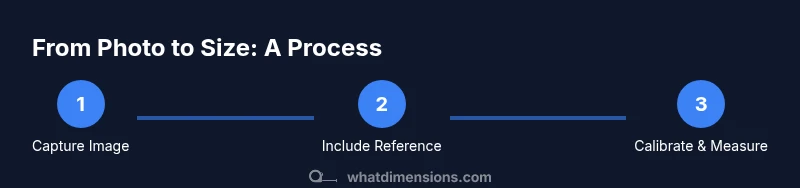
A practical workflow combines photography best practices with app-assisted measurement. Step one is to ensure the object fills a substantial portion of the frame and a reference object is clearly visible. Next, use a combination of built-in tools and external apps to cross-validate results. If you can, capture a second photo from a different angle to mitigate perspective bias. Finally, document the reference size and the method used so others can reproduce the result. This approach is especially helpful for designers and students who need quick, defensible estimates from images.
Accuracy pitfalls and how to minimize errors
Common errors include perspective distortion, uneven lighting, and misalignment of endpoints. Small camera motions can magnify errors, and distant objects reduce accuracy. To minimize these issues, use a stable tripod or surface, shoot at eye level, ensure high contrast between the object and background, and include a clearly marked reference in every relevant shot. Calibrating with a known size helps; but remember that even with calibration, some degree of error persists. What Dimensions recommends documenting the measurement method and confidence level whenever you present results.
Guidelines for designers, students, and DIY enthusiasts
For designers and students, a transparent measurement workflow matters as much as the result. Record the reference object’s size, the camera distance, and the exact points measured. When possible, supplement photo-based estimates with a direct measurement using a ruler or tape measure. If you rely on photogrammetry, acknowledge potential accuracy limits and consider using multiple photos to improve robustness. The overarching principle is to prioritize repeatability and documentation so others can verify your numbers.
Best practices and next steps for real-world use
In practice, treat photo-based measurements as directional guidance rather than final figures. Start with a baseline estimate from the image, then confirm with physical measurements when high precision is required. For ongoing projects, develop a small reference kit (e.g., a ruler and a color reference card) to include in every shot. Over time, you’ll build a reliable workflow that minimizes guesswork and communicates qualifications clearly. What Dimensions’s guidance centers on consistency, calibration, and transparent reporting.
Tools & Materials
- iPhone with current software(Ensure you have the latest iOS and the Measure app installed)
- Reference object (e.g., credit card, coin, ruler)(Must have known, standard dimensions)
- Ruler or measuring tape(For cross-checks and calibration)
- Optional photogrammetry or measurement apps(Use as supplementary tools; verify results with physical measurement when possible)
- Good lighting(Even, diffuse light reduces shadow distortions)
Steps
Estimated time: 15-25 minutes
- 1
Prepare the photo and reference
Choose a photo that clearly shows the object. Place a known reference object in the frame and ensure both the object and reference are in focus. This step creates a dependable scale for subsequent measurements.
Tip: A reference card with printed dimensions works best on flat surfaces. - 2
Open the measuring workflow
Launch the Measure app for live measurements or select a photo-based measurement app if you’re estimating from an image. If you’re using a reference, mark its endpoints to establish scale.
Tip: If the app supports calibration, choose the reference object first. - 3
Mark measurement endpoints
Within the image, tap to designate the start and end points of the dimension you want. Align endpoints with visible edges for better accuracy and avoid mid-line errors.
Tip: Zoom in to place endpoints precisely on corners or edges. - 4
Read and record the measurement
Read the dimension displayed by the app. Note the unit and any scale factors applied via the reference. Record both the measurement and the reference size.
Tip: Take a quick screenshot for future reference or audit trails. - 5
Cross-check with a second method
If possible, capture a second photo from another angle or use a second reference to verify consistency. Compare results to identify potential distortions.
Tip: Discrepancies beyond a small margin indicate perspective error. - 6
Document and apply results
Organize the measurement data with date, device model, reference size, and method. Use the results for planning or purchasing only after validation.
Tip: Keep a simple log or checklist for repeatability.
Quick Answers
Can I measure from any photo I take with my iPhone?
Not reliably. A photo lacks fixed scale and may suffer from perspective distortion. Use a known reference and cross-check with physical measurements for accuracy.
No, not reliably. A photo alone isn’t enough; include a reference and verify with real measurements.
Does the iPhone Measure app work on photos I’ve already taken?
Measure is designed for live use with the camera. Some apps may analyze saved images, but results depend on scale references and camera angle.
Measurement apps mostly work best with live scenes; saved photos depend on references.
What factors affect accuracy when estimating from a photo?
Perspective distortion, lens distortion, lighting, and reference accuracy all impact results. The more controlled these are, the better the estimate.
Angle, lighting, and scale references drive accuracy.
Can I rely on photogrammetry for precise furniture sizing?
Photogrammetry can estimate dimensions from multiple photos but may not reach precision required for furniture purchases without validation.
Photogrammetry can help, but validate with physical measurements.
What reference sizes are best for scaling?
Standard cards, coins, or rulers with clearly printed dimensions are reliable references when included in the shot.
Use standard, clearly labeled references.
Are there iPhone apps that claim to measure from pictures?
Some apps claim this capability, but accuracy varies. Always verify results with a physical measurement when precision matters.
Some apps claim it; verify with real measurements.
Watch Video
Main Points
- Use a known reference to anchor photo measurements
- Live measuring apps work best for real-time sizing
- Photos can provide estimates but require calibration and verification
- Document method and references for reproducibility