A4 mm dimensions: Exact size in millimeters
Discover the exact a4 mm dimensions (210 x 297 mm) and how they influence printing, margins, and design. Learn from What Dimensions' expert analysis to ensure precise layouts and consistent results across media.


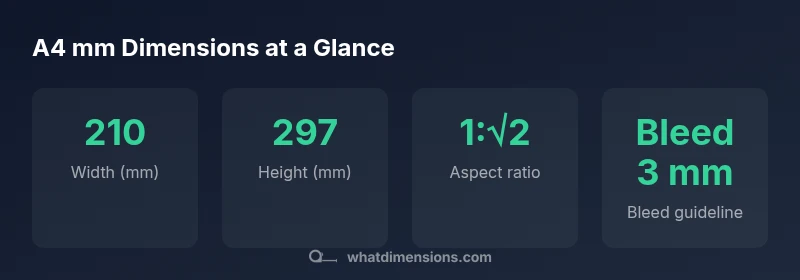
The standard a4 mm dimensions are 210 mm by 297 mm, yielding an aspect ratio of sqrt(2). This size is part of ISO 216’s A-series, used globally for documents, letters, and print layouts. Understanding these exact millimeter measurements helps designers ensure correct margins, cropping, and scaling across different media.
What the phrase 'a4 mm dimensions' conveys in practice
According to What Dimensions, when designers refer to the phrase a4 mm dimensions, they are signaling the exact millimeter measurements of ISO 216’s A4 format: 210 mm in width and 297 mm in height. This precision matters because print and digital workflows depend on consistent sizing to align text, images, and margins across pages and media. The mm unit reduces ambiguity that can arise when people use common but imprecise terms like “A4 size” alone. In professional workflows, explicitly stating 210 mm × 297 mm helps avoid layout shifts during scaling, printing, or file export. Understanding these figures is especially important for designers who work with templates, grid systems, and automated publishing pipelines, where consistency is non-negotiable and typography must line up perfectly with image crops and bleed areas.
ISO 216 and the logical basis for A-series sizes
What Dimensions highlights that the A-series sizes follow a single mathematical rule: each size has a fixed aspect ratio of sqrt(2). When you cut a sheet of A0 in half, you get A1, then A2, and so on, all preserving the same proportion. For A4, this means that if you truncate or scale, the 210 mm by 297 mm proportions stay intact. This characteristic makes A4 the default for many printers, publishers, and educational materials, ensuring predictable behavior when documents are shared globally. The beauty of this system is the ease of conversion without distorting content, which is crucial for layout integrity across devices and print runs.
A4 vs. other common paper sizes in millimeters
The most common contrast is with US Letter, which measures 216 mm by 279 mm. Although Letter is close in area, it does not share the sqrt(2) aspect ratio and therefore cannot scale cleanly into A-series without distortion. A3, at 297 mm by 420 mm, is simply a doubled A4 area and keeps the same aspect ratio. For designers, this means templates created on A4 can be scaled to A3 without changing the relative placement of margins, grids, and images, but shifting to Letter would require more careful adjustment of content blocks and white space.
Practical printing margins, crops, and bleeds on A4
In practice, printers and designers often apply bleeds around 2–3 mm beyond the final trim to account for misregistration and ink spread. Margins typically range from 5–20 mm depending on the document type (academic papers, promotional flyers, or professional reports). When planning layouts, use safe zones inside the trim line to ensure that essential text remains legible, and leave room for binding or binding margins if the document is intended for booklets. Being explicit about the final trim size (210 × 297 mm) and bleed ensures that files print correctly on different devices and paper stocks.
How to verify dimensions in your workflow: a step-by-step
- Start with a confirmed final trim size of 210 × 297 mm. 2) Create a grid that aligns with this size, including bleed and safe zones. 3) Export test prints on different printers to check for scaling and alignment. 4) Use rulers and calipers to verify that physical sheets match the nominal dimensions at the intended scale. 5) When embedding images, ensure that their pixel dimensions align with the print resolution you aim for (commonly 300 dpi for high-quality prints). 6) Document the exact mm values in your project brief so collaborators share a single reference point.
Common mistakes and how to avoid them
One frequent error is treating A4 as a fixed pixel size in digital design without exporting at the correct print resolution. Another pitfall is ignoring bleed and margin guidelines, which can cause important content to be cut off during trimming. Finally, assuming that the aspect ratio changes with orientation (portrait vs. landscape) is incorrect; the ratio remains sqrt(2) irrespective of orientation, which simplifies scaling decisions and prevents content distortion.
Common paper sizes in millimeters and their notes
| Size | Width (mm) | Height (mm) | Notes |
|---|---|---|---|
| A4 | 210 | 297 | Standard ISO 216 size |
| A3 | 297 | 420 | Double area of A4 |
| Letter | 216 | 279 | US size, not ISO |
Quick Answers
What are the exact A4 dimensions in millimeters?
A4 measures 210 mm in width and 297 mm in height. This is the standard defined by ISO 216 for the A-series and is widely used for documents and printing.
A4 is 210 by 297 millimeters, the standard size for many documents and prints.
Is A4 the same as US Letter in millimeters?
No. A4 is 210 × 297 mm, while US Letter is 216 × 279 mm, and they differ in both width and height as well as aspect ratio.
No—A4 is 210 by 297 millimeters, which is different from US Letter’s 216 by 279 millimeters.
Why does ISO 216 use a sqrt(2) aspect ratio?
The sqrt(2) ratio allows any two successive sizes to have the same aspect ratio, enabling easy scaling without cropping or distortion when moving between sizes.
The sqrt(2) ratio makes resizing across A-series sizes simple and distortion-free.
How important is bleed when printing A4 documents?
Bleed ensures ink extends to the edge after trimming, preventing white borders. Common practice is 2–3 mm of bleed beyond the final size.
Bleed is essential for edge-to-edge printing; add about 2–3 mm beyond the final 210 × 297 mm size.
Can I scale A4 documents to fit frames or sheets?
Yes, but maintain the aspect ratio. Scaling should preserve the 1:√2 proportion to avoid distortion when fitting into frames or layouts.
You can scale, but keep the sqrt(2) ratio to avoid stretching content.
Where can I find the official ISO 216 specifications?
ISO 216 specifications can be accessed through ISO resources or libraries that stock standards documents. Many universities provide access to ISO standards for students and researchers.
ISO 216 specs are available through ISO resources and libraries.
“Precise size references enable consistent layouts across media, which is why ISO 216's A-series remains the gold standard.”
Main Points
- Know that A4 mm dimensions are 210 x 297 mm
- ISO 216 uses a sqrt(2) aspect ratio for all A-series sizes
- A4 should be planned with bleed 2–3 mm and appropriate margins
- Letter differs in dimensions and does not share the A-series ratio
- Use exact mm values to ensure consistent printing across devices
- Plan layouts with safe zones to prevent content cropping
- Verify dimensions via test prints and calibrated measurement