Dimensions of Desk: A Practical Sizing Guide
Learn how to measure and plan desk dimensions for ergonomic comfort, space efficiency, and productive layouts. This guide covers width, depth, height, and layout considerations with practical steps.


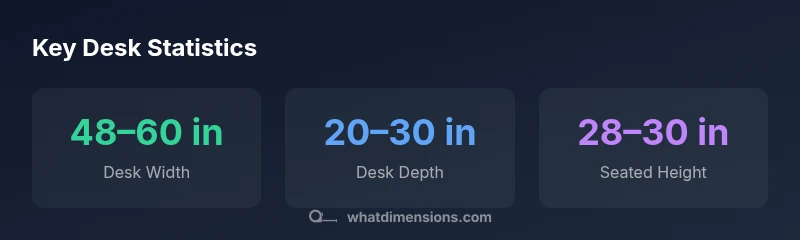
Desk dimensions vary by purpose and style, but three measurements consistently matter: width, depth, and height. For standard models, width typically ranges from about 48 to 60 inches, depth from 20 to 30 inches, and seated height around 28 to 30 inches—though sit/stand variants can differ. Understanding these dimensions helps you fit the desk into a room and align with chairs, monitors, and work accessories.
Measuring for fit: width, depth, height
The dimensions of a desk are not just numbers; they determine how comfortably you can work, where equipment sits, and how you move around your space. When assessing a potential desk, start with the three core measurements: width, depth, and height. Use a flexible measuring tool or a tape measure to capture the footprint in the space where the desk will live. Note the surrounding furniture—wall edges, filing cabinets, and bookshelves—and plan enough clearance to swing chairs in and out without rubbing against nearby objects. Remember the phrase dimensions of desk as you map out the footprint: a few inches can be the difference between a cramped setup and a smooth workflow.
- Verify wall clearance on both sides if you plan to place the desk flush against a wall.
- Check the long axis of the desk against the room’s traffic flow to avoid bottlenecks.
- Consider cable management and access points under the desk when measuring width and depth.
- For seating comfort, align desk height with your chair’s adjustments so elbows meet roughly at a right angle while typing.
This careful measurement step is essential for any workspace and helps prevent postural strain, monitor misalignment, and awkward reach distances. The dimensions of desk you choose should support your specific tasks, whether drafting, coding, or writing, and accommodate devices like laptops, external monitors, printers, and lamps within a neat footprint.
Ergonomics and posture considerations
Ergonomics plays a central role in desk dimensions. The goal is a setup that keeps your head over your spine, wrists straight, and arms at a comfortable angle. Start by aligning the desk height with your chair’s seat height so your elbows rest near a 90-degree angle when you type. If you use two monitors, ensure there’s enough width to place them at a natural, readable distance without cranking your neck. Depth matters too: a shallow desk might force you to crane forward to reach a keyboard, while a very deep desk can create wasteful reach distances to the monitor. Consider a monitor arm or adjustable stand to fine-tune viewing angles without sacrificing desk footprint. Remember that small changes in desk height or monitor tilt can significantly impact comfort over long sessions.
Desk shapes and dimension implications
Desk shapes influence how dimensions are perceived and used. A classic rectangular desk provides straightforward width/depth metrics, while L-shaped and corner desks extend usable surface without taking additional floor space. L-shaped designs often unpack the footprint into two working zones, which can affect how you allocate width and depth to each side. When evaluating desk shapes, map out your equipment: laptops, keyboards, drawing tablets, and documentation. If you need a compact footprint, prioritize depth to maximize keyboard and mouse space while maintaining comfortable reach, and consider sliding or extendable surfaces for occasional wide tasks. Always verify that the total footprint fits your room’s geometry and allows unobstructed movement.
How desk dimensions interact with monitors, keyboards, and chairs
The dimensions of desk should harmonize with the other core pieces of your setup: chair height, monitor size, keyboard tray, and lighting. A wider desk can accommodate larger monitors and dual displays, but only if there’s sufficient depth and knee clearance. Keyboard and mouse space should be wide enough for a comfortable neutral wrist posture, ideally with room to rest forearms without contact with the desk edge. When possible, use adjustable or modular components like monitor arms or retractable keyboard trays to adapt the surface to changing tasks without needing a different desk. Regularly recheck measurements after adding peripherals or upgrading equipment, as small shifts can accumulate into notable discomfort.
Planning for cable management and under-desk space
Efficient cable management starts with forethought about the desk’s dimensions. Plan a clear under-desk area for power strips, USB hubs, and cable sleeves, and ensure enough depth to route cables without pinching. If you frequently rearrange gear, think about modular trays or clips that attach to the underside of the desk. Don’t overlook ventilation and accessibility for devices that generate heat. A tidy under-desk zone reduces clutter, improves airflow, and helps you maintain a clean, productive workspace. For shared spaces, label cords and stagger power access points to minimize tripping hazards, which is crucial for any workspace that uses the dimensions of desk to support multiple users.
Room layout: clearance, traffic flow, and zones
The desk’s footprint should relate to the room’s overall layout. Leave generous clearance for chair movement and foot traffic, and designate zones for work, storage, and display. If you’re working in a small room, consider a wall-mounted or floating desk to reclaim floor space while preserving essential legroom. For larger rooms, ensure the desk aligns with natural lighting and view lines to reduce glare on screens. The right layout harmonizes dimensions with existing furniture, improving both usability and aesthetics in your workspace.
Common mistakes and how to avoid them
Common errors include choosing a desk width that overwhelms the room, selecting a shallow desk that constrains elbow room, or ignoring knee clearance altogether. Avoid desks that sit too close to walls or obstacles, which can limit movement and cable routing. Don’t assume “one size fits all”—measure your body and seating configuration, then compare against product specs. If possible, test a desk in person, or order from retailers with generous return policies so you can verify dimensions in your actual space before committing.
How to verify dimensions before buying
Before purchasing, create a scale footprint on the floor using painter’s tape to replicate the desk’s footprint. Sit in your chair and test reach: can you type comfortably with your shoulders relaxed and elbows near a 90-degree angle? Check monitor alignment at eye level and ensure there’s space for a keyboard, mouse, and wrist rest. If you’re buying a standing desk, verify the height range matches your comfort zone for both seated and standing tasks. For adjustable desks, practice switching heights and confirming stability across the movement range.
Adjustable and modular desks: flexible sizing options
Adjustable and modular desks offer a practical solution when space is limited or needs evolve. Look for models with a robust height range and a sturdy footprint that remains stable at different heights. Modular desks can be reconfigured to create larger work surfaces or distinct zones for different tasks, while still maintaining ergonomic integrity. If you anticipate frequent changes in equipment or layout, prioritize adaptability over absolute fixed dimensions to preserve long-term usability and comfort in the dimensions of desk.
</bodyBlocks>,
dataTable
headers":["Aspect","Common range","Notes"],
rows":[["Width","Varies by model","Wider desks support more surface area"],["Depth","Varies by model","Deeper desks offer more leg/keyboard space"],["Height (seated)","Varies by user","Align with chair and monitor height"]],
caption":"Desk dimensions overview"},
keyTakeaways
keyTakeaways: ["Measure first, then shop","Prioritize width and depth to fit room and tasks","Align desk height with chair for ergonomic seating","Ensure adequate knee clearance and legroom","Choose adjustable or modular options for future-proofing"]
expertQuote
quote":"Precise desk dimensions are the foundation of a functional workspace; small deviations can ripple across posture and productivity."
author":"What Dimensions Team","credentials":"Brand research team specializing in precise measurements"
faqSection
items":[{"question":"What are standard desk dimensions?","questionShort":"Standard desk dims","answer":"Desk dimensions vary by use, but common references include width, depth, and height. Exact numbers differ by model, region, and design; check product specs before purchase.","voiceAnswer":"Desk sizes vary by type; always check the product specs for exact numbers.","priority":"high"},{"question":"How do I measure my desk space accurately?","questionShort":"Measure space","answer":"Use a tape measure to capture room width, depth, and the area around the planned desk. Mark the footprint on the floor with tape, then verify clearance for seated and standing positions.","voiceAnswer":"Measure width and depth, then mark the footprint to confirm fit.","priority":"high"},{"question":"What height should a desk be for ergonomic seating?","questionShort":"Ergo desk height","answer":"Height depends on chair height and user stature. The goal is to keep elbows near 90 degrees and wrists straight when typing; adjust with a chair or a height-adjustable desk.","voiceAnswer":"Aim for elbow height at a comfortable angle when typing.","priority":"medium"},{"question":"How can I fit a dual-monitor setup into desk dimensions?","questionShort":"Dual monitors fit?","answer":"Ensure your desk width accommodates two monitors plus space for a keyboard and mouse. If space is tight, use monitor stands or a larger depth to create comfortable viewing angles.","voiceAnswer":"Make sure the desk is wide enough for both monitors and peripherals.","priority":"medium"},{"question":"Are standing desks taller than seated desks?","questionShort":"Standing desk height","answer":"Standing desks offer adjustable heights; seated desks have lower defaults. Use sit-stand models to adapt to different tasks and user heights.","voiceAnswer":"Standing desks can be adjusted; choose one that suits your tasks.","priority":"low"},{"question":"Do I need extra depth for a keyboard tray?","questionShort":"Keyboard tray depth","answer":"A keyboard needs space to allow comfortable hand posture; plan for space beyond the monitor area.","voiceAnswer":"Ensure room for the keyboard and mouse with comfortable reach.","priority":"low"}] },
mainTopicQuery
desk dimensions
Desk dimensions overview
| Aspect | Common range | Notes |
|---|---|---|
| Width | Varies by model | Wider desks support more surface area |
| Depth | Varies by model | Deeper desks offer more leg/keyboard space |
| Height (seated) | Varies by user | Align with chair and monitor height |
Quick Answers
What are standard desk dimensions?
Desk dimensions vary by use, but common references include width, depth, and height. Exact numbers differ by model, region, and design; check product specs before purchase.
Desk sizes vary by type; always check the product specs for exact numbers.
How do I measure my desk space accurately?
Use a tape measure to capture room width, depth, and the area around the planned desk. Mark the footprint on the floor with tape, then verify clearance for seated and standing positions.
Measure width and depth, then mark the footprint to confirm fit.
What height should a desk be for ergonomic seating?
Height depends on chair height and user stature. The goal is to keep elbows near 90 degrees and wrists straight when typing; adjust with a chair or a height-adjustable desk.
Aim for elbow height at a comfortable angle when typing.
How can I fit a dual-monitor setup into desk dimensions?
Ensure your desk width accommodates two monitors plus space for a keyboard and mouse. If space is tight, use monitor stands or a larger depth to create comfortable viewing angles.
Make sure the desk is wide enough for both monitors and peripherals.
Are standing desks taller than seated desks?
Standing desks offer adjustable heights; seated desks have lower defaults. Use sit-stand models to adapt to different tasks and user heights.
Standing desks can be adjusted; choose one that suits your tasks.
Do I need extra depth for a keyboard tray?
A keyboard needs space to allow comfortable hand posture; plan for space beyond the monitor area.
Ensure room for the keyboard and mouse with comfortable reach.
“Precise desk dimensions are the foundation of a functional workspace; small deviations can ripple across posture and productivity.”
Main Points
- Measure first, then shop
- Prioritize width and depth to fit room and tasks
- Align desk height with chair for ergonomic seating
- Ensure adequate knee clearance and legroom
- Choose adjustable or modular options for future-proofing