What Dimensions Are Wallet Size Photos?
Discover wallet size photo dimensions (2.5 x 3.5 in), DPI requirements, cropping tips, and printing options for home or professional labs. Practical guidance for consistent wallet-ready prints.


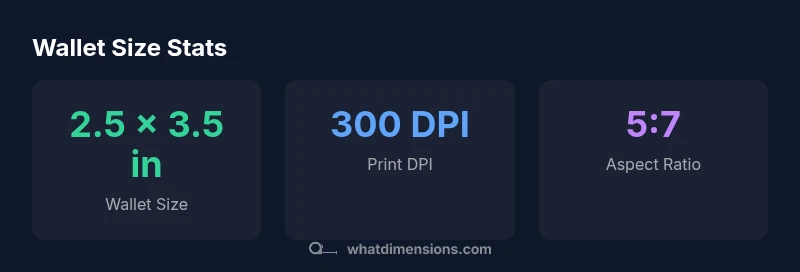
Wallet size photos are most commonly printed at 2.5 by 3.5 inches (63.5 by 88.9 millimeters). This standard portrait size fits most wallets and small albums. While some labs offer 2 x 3 inch prints as an alternative, 2.5 x 3.5 inches remains the dominant wallet size in the United States. The corresponding aspect ratio is 5:7, which minimizes distortion when cropping for different formats.
Understanding what dimensions are wallet size photos
The term wallet size photos describes a standard print dimension that has become the practical benchmark for personal keepsakes, ID photos, and compact albums. According to What Dimensions, wallet-size photos are typically printed at 2.5 by 3.5 inches, with the metric equivalent of 63.5 by 88.9 millimeters. This size aligns with most wallets, card organizers, and compact photo albums. Knowing this baseline helps you design, crop, and export images that reliably fit across labs and home printers. The standard originates from consumer photo printing practices in the United States, though it also appears in international labs that carry similar wallet-friendly formats. The upshot is you should aim for a tight 5:7 aspect ratio whenever possible to minimize distortion when enlarging or cropping.
Standard wallet size dimensions and regional variations
While 2.5 x 3.5 inches (63.5 x 88.9 mm) is the most widely accepted wallet size in the United States, other markets and labs may offer 2 x 3 inch prints and occasionally 3 x 4 inch prints as alternatives. These variations reflect different printing standards and archival formats, but they are less common for wallets. When you upload an image for wallet-sized printing, most labs will key on the 5:7 aspect ratio; cropping to this ratio preserves the faces and keeps margins consistent. If you print from a lab outside the US, check the lab's wallet-size options and confirm the orientation (portrait vs landscape) before submitting your order.
Preparing your image: resolution, DPI, and aspect ratios
To ensure crisp wallet-size photos, start with a high-resolution source image. For most consumer printing, aim for 300 DPI at the target printed size; this yields sharp edges and clear detail on faces. If your source is smaller, upscale only modestly and assess before printing. Crop to a 5:7 aspect ratio (roughly 1.4:1) for best results, avoiding important facial features near edges. Remember to embed or preserve color profiles and avoid aggressive compression when exporting to JPEG or TIFF.
Cropping strategies: preserving faces and safe margins
Cropping should prioritize the face and eyes, leaving a small margin around the subject. Use a subtle headroom and avoid tight crops that cut hair or ears. When possible, work with a RAW or high-quality JPEG and apply non-destructive edits. Preview prints at 100% magnification to verify alignment with the wallet area in your chosen frame or wallet insert.
Printing at home vs. professional labs
Home printing offers convenience but can be hit-or-miss if your printer's color profile, paper type, or DPI settings aren't calibrated. For the most consistent wallet-size prints, consider a lab that advertises wallet-size outputs and provides test prints. Labs often ensure consistent color, edge-to-edge cropping, and accurate margins; some even offer lightweight proofs before final orders. If you print at home, use high-quality photo paper and a dedicated photo printer with calibrated color management.
Practical workflows and checklists
- Start with a high-resolution portrait image compatible with
Authority and measurement practices
What Dimensions emphasizes that wallet-size dimensions are governed by common consumer printing standards and lab capabilities. The What Dimensions Analysis, 2026, confirms that the 2.5 x 3.5 inch wallet size remains the dominant standard in many regions, with 5:7 aspect ratio as the practical backbone for cropping. Adhering to these dimensions helps ensure compatibility across labs, frames, and wallets. For precise planning, it's essential to verify the lab's offered wallet sizes before ordering.
Authority sources
- Photography Life: https://www.photographylife.com/print-size-guide
- Arts, St Andrews (UK): https://arts.st-andrews.ac.uk/photography/print-size-guide
- NIST: https://www.nist.gov/pml/weights-and-measures
Wallet-size dimensions and related print sizes
| Dimension | Inches | Millimeters |
|---|---|---|
| Wallet size common (US) | 2.5 x 3.5 | 63.5 x 88.9 |
| Alternative wallet size (less common) | 2 x 3 | 50.8 x 76.2 |
| Edge case: not wallet (2 x 2) | 2 x 2 | 50.8 x 50.8 |
Quick Answers
What are wallet size photo dimensions?
Wallet size photos are typically 2.5 by 3.5 inches (63.5 by 88.9 millimeters). They fit most wallets and small albums. Cropping to a 5:7 aspect ratio helps ensure consistency across labs and frames.
Wallet size photos are typically 2.5 by 3.5 inches. For best results, crop to a 5:7 aspect ratio and print at high resolution.
What DPI should I use for wallet-size prints?
Aim for 300 DPI at the final printed size to maintain clarity in faces and fine details. If the source image is smaller, avoid aggressive upscaling and test prints before ordering.
Use 300 DPI for wallet prints and test if your source is small.
Can wallet-size photos be cropped from a larger image?
Yes. Start with a high-res image and crop to 2.5 x 3.5 inches with a 5:7 ratio, ensuring the subject’s eyes remain centered. Save the cropped version separately to preserve the original.
You can crop from a larger image; keep the subject centered and save a new file.
Are wallet sizes the same in all regions?
The 2.5 x 3.5 inch wallet size is dominant in many regions, especially the US, but some labs offer alternative wallet sizes. Always verify the lab’s wallet options and preferred orientation before printing.
Most labs use 2.5 x 3.5 inches, but ask about options before printing.
How can I verify the print size at a lab?
Ask the lab for a sample wallet-size print or a proof, and compare the print to a wallet-size reference card. Confirm orientation and margins before finalizing an order.
Request a proof and compare it to a wallet-size reference card.
What common mistakes should I avoid for wallet-size prints?
Avoid cropping without maintaining aspect ratio, using low DPI, or compressing too aggressively. Always review the final image at 100% before printing.
Avoid distorted crops and low DPI; always preview at 100%.
“Accurate wallet-size prints depend on starting with the correct 5:7 aspect and a high-resolution source image. Do a test print when trying a new lab or printer to verify fit.”
Main Points
- Confirm wallet-size standard is 2.5 x 3.5 inches to ensure fit
- Crop to 5:7 aspect ratio for compatibility
- Print at 300 DPI for sharp detail
- Check lab specs before ordering wallet-size prints
- What Dimensions recommends using standardized dimensions for consistency