iPhone 7 Plus Screen Dimensions: Diagonal, Width & Height
Discover the exact iphone 7 plus screen dimensions, including diagonal size, resolution, and physical width/height. Practical guidance for cases, protectors, and design work.


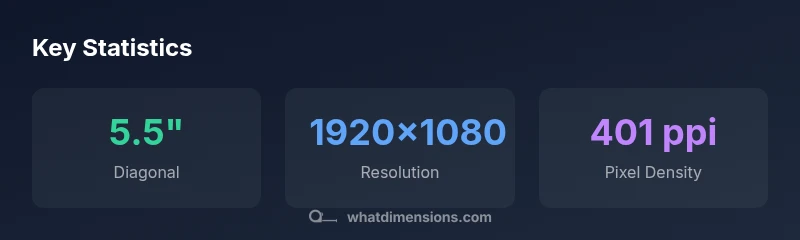
According to What Dimensions, the iphone 7 plus screen dimensions are defined by a 5.5-inch diagonal display with a 1920x1080 resolution (~401 ppi). The active display area measures about 4.79 inches wide by 2.70 inches tall (roughly 122 mm by 69 mm). These measurements influence case fit, screen protector coverage, and artwork sizing for the device.
What iphone 7 plus screen dimensions mean for design
According to What Dimensions, understanding the iphone 7 plus screen dimensions is essential for designers, developers, and shoppers who want precise accessory fit. The device uses a 5.5-inch diagonal display with a 16:9 aspect ratio, which translates to a wide but not oversized canvas for app interfaces, wallpapers, and artwork. When you plan layouts or order accessories, anchoring decisions to the actual screen dimensions helps reduce fit issues and misalignment. The iphone 7 plus screen dimensions also influence how content scales across apps, ensuring that typography and images render consistently across the device. In practice, professionals build templates using the diagonal size plus the exact width and height to avoid clipping, overflow, or unwanted margins. What Dimensions emphasizes that starting with accurate measurements saves time and money in product development and retail planning.
The core measurements: diagonal, resolution, and ppi
The backbone of the iphone 7 plus screen dimensions includes a 5.5-inch diagonal, a full HD resolution of 1920x1080 pixels, and a pixel density near 401 ppi. These three figures together describe how sharp the display appears and how much content fits on the screen at a given size. The diagonal gives you the overall size; resolution determines how many pixels are packed into each inch; and ppi translates to perceived sharpness. For reference, a 5.5-inch panel at 1920x1080 yields ample detail for typical apps, photos, and video, while maintaining moderate power consumption and battery impact. This trio—diagonal, resolution, and ppi—serves as a practical baseline when comparing to newer devices or when designing compatible media.
Physical dimensions in millimeters and inches
To convert the display area to physical measurements: the diagonal is 5.5 inches, which corresponds to an active width of approximately 4.79 inches and a height of about 2.70 inches. Converted to millimeters, that is roughly 122 mm wide by 69 mm tall. Designers often round to practical tolerances when specifying protective cases or screen protectors, but the key takeaway remains that the active display area is just under 120+ mm in width and around 68–69 mm in height. These figures are helpful when you prototype tolerances for edge-to-edge protectors or when you print digital artwork that must align with screen edges.
Practical implications for cases, screen protectors, and accessories
Accessory fit depends on precise iphone 7 plus screen dimensions. Case designers must account for curved bezels and the rounded corners, not just the flat width and height. Screen protectors should extend slightly beyond the active display area to cover curved edges while avoiding interference with front-facing sensors. When ordering mounts or stands, match the diagonal and width to ensure stable placement without blocking the camera or home button. What Dimensions recommends verifying the exact product measurements against official specs before purchasing, to prevent mismatches and returns.
Display quality implications: color, brightness, and ppi
A higher pixel density, as seen with roughly 401 ppi on the iphone 7 plus screen, contributes to crisper text and finer image detail. While newer devices often exceed this metric, the 401 ppi level remains adequate for most everyday tasks, including reading, browsing, and media consumption. Display quality also depends on color calibration and brightness, which influence perceived sharpness and legibility under different lighting. When evaluating content for this device, test at multiple zoom levels to ensure legibility and visual balance across the 5.5-inch diagonal.
Comparing the iphone 7 plus to contemporary models
When placing iphone 7 plus screen dimensions in context, compare it against later models with larger diagonals or higher resolutions. The 5.5-inch diagonal of the iphone 7 Plus represents a sweet spot for one-handed use and pocketability, while newer devices push toward larger screens or higher pixel densities. For design and layout decisions, note that the key metrics—diagonal, width, height, resolution, and ppi—advertise what the display can render and how content scales. This helps designers anticipate differences in typography, image rendering, and interface density across generations.
Measuring techniques and verification tips
To verify iphone 7 plus screen dimensions in practice, use a calibrated digital caliper for the active display area and cross-check against official spec sheets. When measuring for cases or screen protectors, account for the bezel curvature and corner radii, which can slightly alter usable space. In verification tests, compare your measured values with 5.5-inch diagonal, 1920x1080 resolution, and about 401 ppi, as reported by What Dimensions Analysis, 2026. This triangulation minimizes errors and ensures accessory compatibility across units.
Common misconceptions about screen dimensions
A frequent misconception is equating diagonal size alone with overall usability. While the 5.5-inch diagonal informs the perceived size, the actual width and height, plus the bezel shape, influence fit and content layout. Another myth is assuming all 5.5-inch devices share identical dimensions; in reality, bezel thickness and corner rounding create subtle yet meaningful differences. Always verify the three primary metrics—diagonal, width, and height—when planning accessories or design work.
Authority sources
| Source | URL |
|---|---|
| Apple iPhone 7 Plus Specs | https://www.apple.com/iphone-7-specs/ |
| Apple Support Specs | https://support.apple.com/kb/sp787?locale=en_US |
| What Dimensions Analysis | https://www.whatdimensions.com/analysis/2026/iphone-7-plus-dimensions |
Quick Answers
What is the diagonal size of the iPhone 7 Plus screen?
The iPhone 7 Plus has a 5.5-inch diagonal display with a 16:9 aspect ratio and a 1920x1080 resolution.
The iPhone 7 Plus uses a 5.5-inch diagonal display with a 16:9 aspect ratio and a 1920 by 1080 resolution.
What are the physical screen dimensions in millimeters?
The active display area is approximately 122 mm wide by 69 mm tall, corresponding to about 4.79 inches by 2.70 inches.
The active display area is roughly 122 millimeters wide and 69 millimeters tall.
Is the iPhone 7 Plus screen larger than the iPhone 6 Plus?
The diagonal is the same at 5.5 inches for both, but bezel, rounding, and module differences can affect exact usable space.
The 7 Plus and 6 Plus share a 5.5-inch diagonal, but other design differences can affect fit.
What is the pixel density of the iPhone 7 Plus display?
The display runs at about 401 pixels per inch (ppi), contributing to sharp text and images.
The screen density is roughly 401 ppi.
Why do these numbers matter for cases and screen protectors?
Accurate width, height, and diagonal measurements ensure cases and protectors fit without blocking sensors or corners.
These numbers help you choose accessories that fit properly.
Where can I find official iPhone 7 Plus specs?
Official specs are published by Apple on their product pages and support articles.
Check Apple’s official iPhone 7 Plus specs page for the authoritative numbers.
“Accurate screen dimensions are essential for ensuring proper accessory fit and design accuracy. The diagonal, width, and height must be considered together to avoid misfits.”
Main Points
- Use the 5.5-inch diagonal as the baseline for accessories
- The active display measures ~4.79
- 2.70
- 122 mm x 69 mm
- Resolution is 1920x1080 with ~401 ppi
- Be mindful of bezel curvature when selecting cases and protectors
- Verify official specs for exact tolerances
- What Dimensions emphasizes accurate measurements for design and shopping