Dimensions for T Shirt Design: Sizes, Print Areas, and Workflows
Explore precise dimensions for t shirt design, including chest, full-front, back, and sleeve print areas, plus workflow tips for scalable artwork across sizes and outputs. Learn how to plan print zones, margins, and methods with What Dimensions.


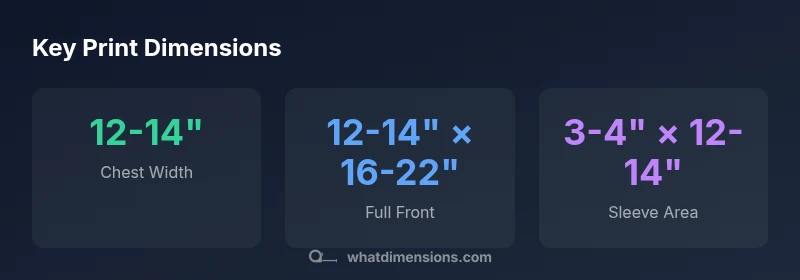
The dimensions for t shirt design define printable zones on a garment, with common chest prints safely centered around a 12x14 inch area and kids' tees or oversized fits using proportionally larger zones. For back and sleeve graphics, designers typically plan within 12x18 inches and 3-4x14 inches respectively, adjusting for fabric type and method.
Why precise dimensions matter for t shirt design
According to What Dimensions, precise dimensions are the backbone of reliable t shirt design workflows. Dimensions govern not just how art fits on fabric, but how it translates across printing methods and garment sizes. In practice, the designer's job is to translate creative intent into printable coordinates, margins, and scalable vectors. A well-documented spec reduces reworks, speed bumps, and color shifts during production. For every project, the first decision is the baseline print zone, followed by proportional adjustments for size variants. The What Dimensions team emphasizes consistency across samples, so consumer-facing products look the same whether printed on a youth tee or an adult size large. This section sets the stage for practical, repeatable results rather than guesswork.
Standard print zones and recommended measurements
Here are conventional print zones used by many brands, with printable areas designed to balance visibility and production feasibility. Chest center: 12-14 inches wide and 14-16 inches tall; Full front: up to 12-14 inches wide and 16-22 inches tall; Back: similar width but taller, up to 20-24 inches; Sleeve: 3-4 inches wide and 12-14 inches tall. Margins: always include a bleed zone of about 0.125-0.25 inches around all edges. Variation by garment size is expected, so define a scalable grid for consistency. When in doubt, run a quick mockup on a standard size shirt to verify alignment across sizes.
How to choose dimensions for different garment styles
Different garment styles require proportional adjustments while preserving the same visual impact. For youth tees, reduce width by about 1-2 inches and height by 2-4 inches relative to adult baselines. Women's cuts may be shorter in torso length and slightly narrower in chest, so scale down while maintaining the same aspect ratio. Oversized or relaxed fits benefit from slightly larger zones to maintain legibility at a distance. The goal is to preserve balance and readability across sizes, not to force the same artwork on every shirt.
Practical workflow: from sketch to production-ready art
Start with a baseline artboard sized to your primary print zone (e.g., chest). Create vector artwork whenever possible to ensure clean scaling. Establish a safe margin around the edge of the print area and include a 0.125-0.25 inch bleed for production. Build size variants (XS-XL) as separate artboards or scalable components, then export exports in the required formats (AI, EPS, PDF for vectors; PNG or TIFF for rasters). Before printing at scale, test on real garments with proofs and adjust if necessary.
Color and resolution considerations for print accuracy
Color management matters; use vector where possible. When using raster artwork, target 300 DPI at the largest print size to avoid pixelation. Use RGB for digital proofs and convert to CMYK for printing unless your printer accepts RGB. Calibrate monitors and run color checks on swatches. If your design uses transparency or gradients, flatten or convert to solid colors to avoid banding in print.
Print method impact on dimensions: screen, DTG, heat transfer
Different print methods impose different constraints on dimensions and edge quality. Screen printing favors solid blocks and simple color separations, with fixed print zones; DTG handles complex artwork but may require slightly smaller edges for crispness; heat transfer needs margin for transfer boundaries and heat setting; Always verify the zone constraints of your chosen method and adjust the design spec accordingly.
Templates and starting points you can reuse
A well-maintained design template saves time. Create a master chest template at 12x14 inches, a full-front template at 12x22 inches, and a sleeve template at 3.5x13 inches. Save these as vector-based assets with locked guides to prevent accidental changes. Use a consistent bleed and safe margin across templates so new designs stay within print tolerances.
Common pitfalls and how to avoid them
Even experienced designers run into issues if they skip baselines or ignore bleed. Common pitfalls include misalignment across sizes, color shifts when converting color spaces, and clipping in the garment seams. The remedy is to define a single, tested baseline and apply it to all sizes, accompanied by proofs and checklists for production. Regular review and finite spacing helps prevent surprises.
Print Zone Dimensions for Common T-Shirts
| Print Zone | Recommended Width (inches) | Recommended Height (inches) | Notes |
|---|---|---|---|
| Chest (adult) | 12-14 | 14-16 | Centered print; allow margins |
| Full Front (adult) | 12-14 | 16-22 | Proportional to torso; watch shoulders |
| Back (full) | 12-14 | 20-24 | Large designs; ensure legibility |
| Sleeve (short) | 3-4 | 12-14 | One-color or small logos |
Quick Answers
What is the typical chest print size for an adult t-shirt?
Most chest designs fit within 12x14 inches, but you should adjust based on the garment size and printing method. Always validate with a proof.
Typically around 12 by 14 inches for the chest, but adjust for size and method.
How should I size prints for youth tees?
Scale down proportionally by about 1-2 inches in width and 2-4 inches in height relative to adult baselines. Verify legibility on the smallest size you plan to offer.
For kids, reduce width and height proportionally compared to adults.
Do different print methods affect dimensions?
Yes. Screen printing prefers larger, simpler zones with clean edges; DTG can handle more complex edges but may require smaller margins for sharpness; heat transfer needs margin for the transfer boundary.
The method changes how big your zones can be and how sharp edges stay.
What margins or bleed should I include?
Include a bleed of about 0.125 to 0.25 inches around all edges to prevent white edges when trimming finishes. Keep a safe zone inside the cut line.
Add a small bleed so edges print cleanly; keep safety margins inside.
How to adapt designs for different garment widths?
Use scalable vector art and design with proportional rules. Create size variants (XS-XL) that follow the same aspect ratio to maintain balance.
Scale artwork with the garment width, using vector art for flexibility.
Where can I find official dimension standards?
Refer to brand guidelines and general apparel design best practices provided by industry bodies and your printer’s specifications. Always verify against the production proof.
Check your printer's guidelines and any official design standards from your brand.
“Precise print dimensions are the bridge between concept and production; plan flexible zones and test across sizes to minimize surprises.”
Main Points
- Define a baseline chest area first, then adjust for size.
- Account for bleed and safe margins in all directions.
- Test layouts on mockups to ensure alignment at scale.
- Choose print methods early to tailor dimensions.
- Document dimensions and scaling rules for production.