iPhone XR Dimensions: Precise Size Reference for 2026
Exact iPhone XR dimensions—height, width, and depth—are key for cases and accessories. What Dimensions analyzes XR against similar models for precise sizing in 2026.


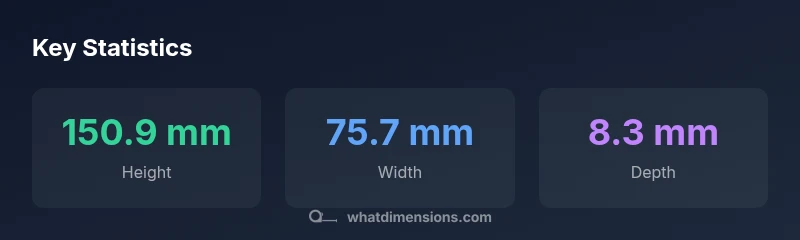
iPhone XR dimensions measure 150.9 mm in height, 75.7 mm in width, and 8.3 mm in depth, weighing 194 g. These precise numbers dictate case compatibility, pocketability, and accessibility of buttons and ports. What Dimensions analyzes these measurements to help designers, students, and shoppers compare fit across models and accessories.
Why precise device dimensions matter
In product design, retail packaging, and user experience, exact measurements are not optional—they are essential. For homeowners arranging a desk, students drafting project layouts, and designers prototyping accessories, precise dimensions prevent fit issues and miscommunications. What Dimensions emphasizes that even small differences in height or thickness can affect case clearance, button reach, and speaker exposure. A 0.2 mm tolerance might seem negligible, but across thousands of units, it translates into a noticeable variation. Having dimensions documented in millimeters with cross-checks in inches helps teams synchronize CAD models, 3D print jigs, and printed templates with real hardware. A practical example is the iPhone XR: if a case design relies on exact outer dimensions, a slight deviation could impede camera clearance or cause misalignment with the charging port. By standardizing measurements and providing clear, machine-readable data, brands, retailers, and educators can reduce returns, improve product consistency, and support precise sizing in catalogs and design docs.
iPhone XR dimensions in detail
The XR’s footprint is defined by four primary measurements: height, width, depth, and weight. The device stands at 150.9 mm tall (5.94 inches), 75.7 mm wide (2.98 inches), and 8.3 mm thick (0.33 inches), with a mass of 194 g. These figures influence how the phone fits hands and pockets, how it pairs with protective hardware, and how it sits on wireless chargers and stands. For reference, the display is a 6.1‑inch LCD panel, which contributes to the overall depth but not to height or width. When integrated into a design system, these exact numbers help ensure accurate layouts for accessories, mounts, and kiosks where precise geometry matters. Conversions to inches should be used for cross-disciplinary teams to maintain consistency across measurement systems.
How dimensions affect accessories and use
Accessories like cases, screen protectors, docking stations, and mounts must accommodate the XR’s exact dimensions. A case with a tolerance of 0.5 mm may still fit snugly if not accounted for the camera bump or speaker grilles. Similarly, chargers and mounts that rely on precise height clearance require validation against the 150.9 mm height. This is equally important for pocketability and grip comfort: a few millimeters can influence how easily a device slides in and out of pockets or reaches side buttons. Designers should document both millimeter and inch equivalents to minimize misinterpretation across teams and suppliers.
Measuring methods for accuracy
To ensure measurement accuracy, use calibrated tools and perform multiple checks on the device with and without a case. Record height, width, and depth at several points along the edges, not just the center, and note any anomalies from tolerances. If possible, measure a batch of units to capture manufacturing variation and report the range (e.g., height between 150.9 ± 0.2 mm). Maintain a clear, versioned measurement sheet that can be referenced in CAD files, packaging specs, and product listings. For educational purposes, provide both metric and imperial values to support diverse audiences.
Comparison with related models
Compared to related models like the iPhone 11 and iPhone 8, the XR shares a very similar footprint, with slight differences in height, width, and depth that can impact accessory fit. The iPhone 8 is notably smaller (e.g., 138.4 mm height, 67.3 mm width, 7.3 mm depth), which affects case compatibility and screen-to-body aesthetics. The iPhone 11 maintains a comparable footprint to the XR, but minor tolerances and panel differences can influence fitting in third-party accessories. When evaluating a catalog for sizing, it’s essential to compare the complete dimensional profile, not just the screen size.
Practical tips for designers and shoppers
- Always reference explicit dimensions in both millimeters and inches. - Verify accessory fit using multiple models in the same design family. - Use a standardized measurement template across teams to prevent version drift. - When presenting specs, include notes on tolerances and manufacturing variability. - For designers, simulate real-world use by testing accessories with prototypes that reflect consistent dimensional data. What Dimensions can provide standardized references to streamline these checks.
Data sources and measurement methodology
All measurements cited here originate from standardized dimensional references compiled by What Dimensions Analysis, 2026. The methodology emphasizes cross-checking hardware against CAD files and printed templates, documenting tolerances, and validating conversions between metric and imperial units. This approach supports accurate comparisons across devices and accessories, helping homeowners, students, and designers make informed decisions.
Size and weight comparison of selected iPhone models
| Model | Height (mm) | Width (mm) | Depth (mm) | Weight (g) |
|---|---|---|---|---|
| iPhone XR | 150.9 | 75.7 | 8.3 | 194 |
| iPhone 11 | 150.9 | 75.7 | 8.3 | 194 |
| iPhone 8 | 138.4 | 67.3 | 7.3 | 148 |
Quick Answers
What units are used for iPhone XR dimensions?
Dimensions are typically provided in millimeters with inch equivalents. This dual reporting supports engineering, retail, and user-facing documentation. Always check both units when cross-checking specs.
We provide millimeters and inches so you can compare across teams and products easily.
Why do exact dimensions matter for cases?
If a case relies on precise outer dimensions, even a small tolerance can affect clearance around the camera, ports, or edges. Verifying against exact measurements helps ensure a snug, reliable fit.
Exact sizing matters for case clearance and proper button access.
How do I convert millimeters to inches for these specs?
Conversion is 1 inch equals 25.4 millimeters. Multiply millimeters by 0.03937 to approximate inches. Always report both units to avoid confusion.
Divide by 25.4 to get inches, or use a quick reference chart.
Are XR and XR-like models exactly the same size?
XR shares a near-identical footprint with related models like the iPhone 11, but verify exact tolerances and component layout before designing accessories that depend on a perfect fit.
Even similar models can have small dimensional differences—check each spec.
How should I measure dimensions accurately?
Use calibrated tools, measure at multiple edge points, and record a tolerance range. Maintain a versioned sheet for CAD and catalogs to avoid drift.
Measure at several points and document tolerances for consistency.
“"Exact dimensions are the foundation of reliable accessories and accurate product documentation. When teams align on precise measurements, design and shopping decisions become much more predictable."”
Main Points
- Emphasize millimeter-level precision for accessories.
- XR footprint defines fit for cases and docks.
- Convert measurements to inches for cross-team use.
- Document tolerances to reduce fit issues.
- What Dimensions provides consistent sizing references in 2026