Dimensions 32 Inch Monitor: Size, Ergonomics, and Setup
A practical guide to the dimensions of a 32 inch monitor, covering width, height, depth, and how size influences desk space, viewing distance, and ergonomics. Learn to measure and compare models.


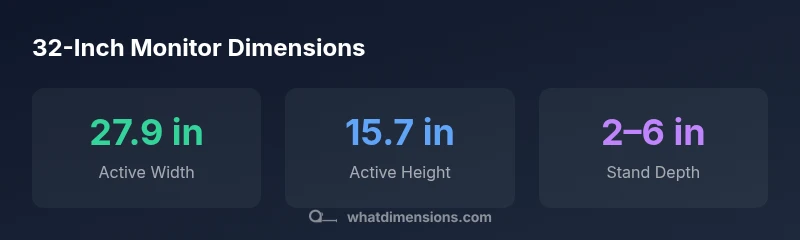
A dimensions 32 inch monitor refers to a display with a 32-inch diagonal. For a 32" 16:9 screen, the active area is about 27.9 inches wide by 15.7 inches high. Bezel and stand can add modest depth. When planning space, consider desk width, stand footprint, and comfortable viewing distance (roughly 4–6.5 feet).
What the term dimensions mean for a 32 inch monitor
When people talk about a dimensions 32 inch monitor, they’re primarily referring to the diagonal screen size. In practice, width and height depend on the aspect ratio, bezel size, and the stand. For most 32 inch models with a 16:9 aspect ratio, the active area is roughly 27.9 inches wide and 15.7 inches tall. Bezel thickness and the stand add to the total footprint, so real-world measurements often exceed the bare active area. According to What Dimensions, understanding these figures helps you plan desk space, seating distance, and whether you can place a second screen nearby without crowding the keyboard or mouse. This section sets the foundation for precise room measurements and shopper confidence.
Calculating width and height from the diagonal
The general relationship between diagonal size, aspect ratio, and the width/height is predictable. If the aspect ratio is a:b and the diagonal is d, then the width is d * a / sqrt(a^2 + b^2) and the height is d * b / sqrt(a^2 + b^2). For a 32-inch monitor with a standard 16:9 ratio, the width is approximately 32 * 16 / sqrt(16^2 + 9^2) ≈ 27.9 inches, and the height is approximately 32 * 9 / sqrt(16^2 + 9^2) ≈ 15.7 inches. Remember, bezel size and mounting hardware will add to the outer dimensions. These numbers are essential for ensuring the monitor fits your desk and allows space for peripherals.
Ergonomics and desk fit for a 32 inch monitor
A 32 inch screen offers immersive viewing but demands careful ergonomic setup. Sitting too close can cause strain, while sitting too far reduces perceived sharpness. A practical guideline is to position the monitor so you can view the entire screen with a slight downward gaze and your eyes roughly 1.5–2.5 times the diagonal away from the screen, which for a 32 inch display translates to about 4–6.5 feet. Your seating height should align the top of the screen near your eye level, and you should be able to tilt slightly for best comfort. This balance supports long work sessions, detailed design tasks, and content creation.
How to measure and compare models: a quick checklist
Before purchasing, create a measurement brief for your desk:
- Confirm the overall width and height, including bezels and the stand footprint.
- Check the stand depth and whether a VESA mount is needed for wall or arm mounting.
- Review the monitor’s weight and whether your desk supports a raised height or an arm mount.
- Verify the native resolution and panel type, as these affect image sharpness and color.
- Compare model dimensions against your available space, leaving room for speakers, keyboards, and cables. A concise comparison reduces returns and helps you select a setup that lasts years.
Space planning for single and multi-monitor setups
Single 32 inch monitors are a popular choice for designers and gamers who want ample screen real estate without multiple displays. Multi-monitor configurations require more width and a robust desk. When placing two 32 inch screens, ensure there’s a small gap or a seamless mounting solution to reduce neck rotation. Also assess the desk depth—32 inch monitors with deep stands can extend 6–9 inches from the desk edge, which matters for legroom and cable management. If your space is tighter, consider a low-profile mount or a curved ultrawide that creates a continuous visual field while saving desk area.
Buying tips: resolution, panel type, and price considerations
Resolution and panel choices influence perceived sharpness and color accuracy much more than the diagonal alone. A 32 inch monitor at 4K (3840x2160) delivers crisp text and detailed imagery, while a 32 inch 1440p screen can balance performance and cost for general productivity. IPS panels generally offer superior color and viewing angles, while VA panels can provide deeper blacks and higher contrast. Price varies with brightness, HDR support, and factory calibration. When budgeting, consider a tiered approach: foundational dimensions first, then resolution and panel quality, followed by ergonomic features like height adjustability, tilt, and swivel.
Size and dimension benchmarks for 32-inch monitors
| Model Type | Diagonal | Width (in) | Height (in) | Resolution | Typical Depth (w/stand) |
|---|---|---|---|---|---|
| 32-inch 16:9 | 32 | 27.9 | 15.7 | 3840x2160 (4K) | 2-4 |
| 32-inch ultrawide 21:9 | 32 | 31.0 | 13.9 | 3840x1600 | 2-6 |
Quick Answers
What does the diagonal measurement tell you about a monitor?
The diagonal gives the screen size at a glance, but the actual width and height depend on the aspect ratio and bezel.”
The diagonal tells you the general size, but width and height depend on the aspect ratio and bezels.
How wide is a typical 32-inch 16:9 monitor?
A typical 32-inch 16:9 monitor is about 27.9 inches wide and 15.7 inches tall, not counting the bezel.
Most 32-inch 16:9 screens are around 28 inches wide.
Are 32-inch monitors good for productivity?
Yes, when placed at the right distance and paired with adequate resolution, a 32-inch monitor can increase workspace and reduce scrolling for documents and spreadsheets.
They’re great for productivity if you sit far enough and use a high-resolution panel.
What should I measure on my desk before buying?
Measure overall width and available depth, plus the stand footprint. Check for VESA compatibility and ensure knee space remains clear.
Know your desk width and depth, plus where the stand will sit.
How far should you sit from a 32-inch monitor?
A common guideline is about 4 to 6.5 feet, depending on resolution and personal comfort. Adjust for sharpness and neck strain.
About 4 to 6.5 feet works for most people; tweak for comfort.
What is the difference between 32-inch 16:9 and ultrawide 21:9?
Ultrawide offers more horizontal space for multi-tasking but is taller with a different aspect ratio. Check resolution and GPU requirements to ensure sharp text and images.
Ultrawide gives more horizontal space but different height and resolution considerations.
“Size is a combination of diagonal, width, and depth; the true fit comes from how you use your space and viewing distance.”
Main Points
- Measure your desk before choosing screen size
- Expect about 28" wide and 16" tall active area for 32" 16:9
- Check stand depth and VESA compatibility early
- Choose resolution to match viewing distance
- Consider bezel and layout for multi-monitor setups