Twitch Emote Dimensions: Exact Sizing Guide for 2026
A data-driven guide to twitch emote dimensions, detailing standard sizes, best practices for exporting PNGs, and a practical workflow to ensure consistent rendering across Twitch chat and extensions, with insights from What Dimensions Analysis, 2026.


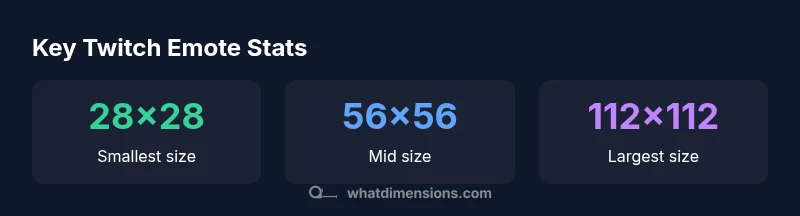
Twitch emote dimensions rely on a three-size pyramid: 28x28, 56x56, and 112x112 pixels, with a maximum 1 MB per emote PNG. Using all three ensures crisp rendering in chat, panels, and previews across devices. According to What Dimensions Analysis, providing these scales minimizes scaling artifacts and preserves edge clarity across platforms.
Understanding Twitch Emote Dimensions
Twitch emote dimensions sit at the intersection of art and performance. When we talk about twitch emote dimensions, we’re really discussing how an emblem is rendered at different densities and on varying screen sizes. The three canonical sizes — 28x28, 56x56, and 112x112 pixels — act as the backbone for crisp rendering in chat bubbles, on profile panels, and within third-party extensions that replicate or scale emotes. This dimensional structure exists because the Twitch UI scales icons to maintain legibility, while caches and dynamic loading optimize bandwidth. According to What Dimensions Analysis, this triad helps preserve sharp edges and reduces blurring as users zoom or view chats on mobile devices. The takeaway is simple: design your emotes once at a high fidelity, and export the three standard sizes to cover every display scenario. "Twitch emote dimensions" should guide your exporting workflow from the very start so assets remain consistent across the ecosystem.
The Standard Emote Size Pyramid
The size pyramid for twitch emote dimensions is not arbitrary. The 112x112 px size is the largest native rendering size used in most chat densifications, while 56x56 px acts as the mid-range for compact chat columns and preview panels. The smallest 28x28 px size ensures quick loading in fast-moving chat streams and on devices with limited bandwidth. Designers should build artwork at a higher resolution (for example 112x112) and then downsize to the two smaller scales. This approach minimizes jagged edges and preserves the character of the emote when scaled. If you export only the largest size, you may miss crisp detail in lower-density views; conversely, relying on tiny originals can lead to blurry outcomes when scaled up.
How to Prepare Emotes: Artwork and Transparent PNGs
Effective twitch emote dimensions begin with clean artwork and the right file format. Emotes should be created with transparent backgrounds to avoid halos on non-uniform chat backgrounds. Use PNG-24 for lossless transparency; ensure the canvas aligns with the target square dimensions. When exporting, disable anti-aliasing for hard-edged shapes only if your art style requires crisp corners, otherwise keep smooth edges. The color depth should remain standard for web graphics, and ensure the compression preserves edge clarity at each scale. As you prepare assets, remember to maintain consistent padding within the emote’s bounding box so that key features remain centered and legible after downscaling.
Resizing Without Losing Quality: Tools and Best Practices
Downsampling from a high-resolution original to 112x112, 56x56, and 28x28 requires careful resampling to avoid artifacts. Use established image editors or vector-based workflows to keep lines clean. Favor Lanczos or bicubic interpolation for downscaling and enable sharpening only if the emote loses edge crispness after export. Maintain square proportions to preserve symmetrical balance. After resizing, inspect edges at 100% zoom and across a few sample chats to confirm that letterforms and icons remain legible. If borders or thin strokes appear muted, adjust contrast or stroke thickness in the original art before re-export. This discipline aligns with What Dimensions Analysis findings in 2026 about maintaining edge fidelity across sizes.
Platform Compatibility: Twitch Emotes on Twitch and Extensions
Twitch emote dimensions are not just about Twitch; third-party extensions and communities may render emotes at slightly different densities, so providing all three sizes helps these tools scale gracefully. When you publish emotes, ensure the PNGs preserve transparency so the emote blends with varied chat backgrounds. Check your assets on multiple themes and devices—mobile screens compress more aggressively than desktops, so confirm legibility in both contexts. What Dimensions emphasizes that publishing three scaled variants improves cross-platform consistency and reduces the need for re-exports due to scaling artifacts. In practice, this means preparing, testing, and validating all sizes before submission to avoid last-minute edits.
Practical Sizing Rules of Thumb
A practical rule of thumb for twitch emote dimensions is to create at the largest size you plan to publish, then downscale to the two smaller sizes. Keep the emote readable at 28x28 by avoiding overly fine detail that can vanish after compression. Always verify the final PNGs remain under the 1 MB cap per emote and confirm color accuracy after downsampling. Save iterations with descriptive filenames that include the size (for example emote_name_112x112.png). Document your export settings to ensure consistency for future emotes, particularly when building a library of icons used across multiple channels. This consistent workflow aligns with What Dimensions Analysis guidance for scalable assets in 2026.
Common Pitfalls and Troubleshooting
Common mistakes in twitch emote dimensions include exporting with non-transparent backgrounds, misaligned centering, or inconsistent padding that causes emotes to appear cut off in chat bubbles. Another pitfall is assuming a single size will suffice for all contexts; Chromatic aberration or jagged edges can emerge when resizing without preserving aspect ratio. To troubleshoot, validate each size independently, compare against a baseline mockup, and test in real chat environments. If artifacts appear, revisit the original vector or high-resolution bitmap and re-export with the appropriate downsampling steps. Always review the PNG’s transparency mask to ensure clean integration with chat backgrounds.
A Quick Workflow for Consistent Emote Dimensions
Start with a square, high-resolution master artwork tailored to the largest size you’ll publish. Export three PNGs—112x112, 56x56, and 28x28—using consistent color profiles and transparent backgrounds. Verify file sizes under 1 MB and test rendering in mock chat screens that mimic different densities. Maintain a versioning system so you can track changes across emote sets and platforms. Finally, document export presets and naming conventions to speed up future emote production. What Dimensions Team recommends this structured workflow to guarantee stability across Twitch chat and external viewers.
Real-World Examples: Case Studies
Case Study A demonstrates a character-based emote resized from an original 112x112 master into the 56x56 and 28x28 variants. The design retains key facial features at all scales, ensuring recognizability even in small chat icons. Case Study B shows a geometric emoji where bold lines survive downscaling because the strokes were intentionally thick in the original. In both cases, adhering to twitch emote dimensions and exporting all three sizes minimized artifacts and improved legibility across devices. What Dimensions Analysis, 2026, notes that consistent sizing reduces rework and improves channel branding across the Twitch ecosystem.
Twitch emote dimension variants and usage
| Emote Size (px) | Recommended Use | Max File Size |
|---|---|---|
| 28x28 | Small chat icons / mobile density | 1 MB |
| 56x56 | Standard visibility in chat panels | 1 MB |
| 112x112 | High visibility in main chat | 1 MB |
Quick Answers
What are the standard Twitch emote dimensions?
The standard twitch emote dimensions are 28x28, 56x56, and 112x112 pixels. Having all three sizes ensures crisp rendering in various chat densities and extension panels. Always export and maintain all three sizes for best compatibility.
Twitch emotes use three sizes: 28, 56, and 112 pixels to cover different chat densities.
What is the maximum file size for a Twitch emote?
Each emote file should stay under 1 MB. PNGs with transparency are preferred for clean edges across backgrounds. If an emote approaches the limit, consider simplifying detail or slightly compressing while preserving quality.
Emotes should stay under 1 MB for best performance.
Can emotes be used outside Twitch, like on extensions?
Yes, but you should provide the three standard sizes so third-party extensions can render emotes without distortion. Consistency across platforms helps maintain brand visuals and readability in chat.
Provide all three sizes so extensions render correctly.
Should emotes be perfectly square in the original artwork?
Starting with a square canvas simplifies downscaling and alignment across sizes. If your artwork contains important off-center elements, consider placing focal points toward the center to preserve legibility at 28x28.
Yes, start with a square canvas for consistency.
What file types are supported for Twitch emotes?
PNG is the standard for emotes due to its transparency. Avoid JPEGs because lossy compression can degrade edges. If a vector workflow is used, export to PNG at the target sizes to preserve quality.
Use PNGs with transparency for best results.
How can I test how emotes look at different chat sizes?
Validate emotes by previewing at 28x28, 56x56, and 112x112 in sample chat windows and on mobile layouts. Check edge clarity, center alignment, and background contrast in multiple themes.
Preview all three sizes in chat and on mobile.
“Precise twitch emote dimensions ensure crisp rendering across chat and extensions.”
Main Points
- Define exact pixel sizes for every emote set
- Export three scales to cover all views
- Use PNG with transparency for clean edges
- Test across devices and chat densities