Dimensions vs Resolution: A Practical Guide to Image Sizing
Learn how dimensions and resolution interact, how to balance them for print and digital media, and practical steps to verify clarity across posters, websites, and social media.


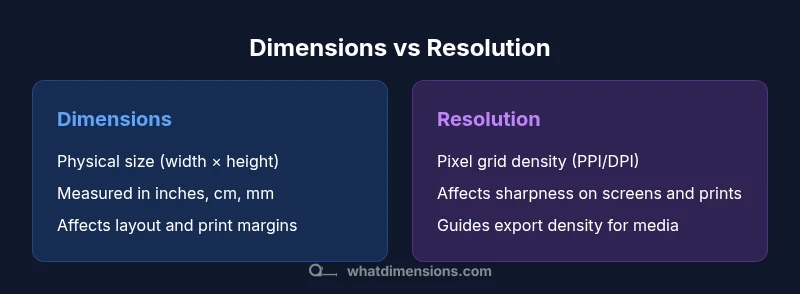
Dimensions vs resolution describes two distinct aspects of image quality: the physical size and the pixel grid. Dimensions refer to the width and height of an image in units such as inches or centimeters. Resolution describes how many pixels fill that footprint, often expressed as pixels per inch (PPI) or dots per inch (DPI) for print. For print or display, aligning dimensions with the appropriate resolution ensures sharp, accurate results.
What dimensions vs resolution mean in practice
Understanding dimensions vs resolution helps ensure your images look correct across all mediums. Dimensions describe the physical footprint of an image when printed or displayed, expressed as width × height in units like inches or centimeters. Resolution, on the other hand, describes how many pixels fill that footprint, often discussed as pixels per inch (PPI) or dots per inch (DPI) for print. These two concepts are related but govern different outcomes: space, clarity, and detail. For designers, photographers, and students, misalignment between the two can lead to wasted files, longer production cycles, and results that fall short of expectations. The What Dimensions team notes that teams who plan dimensions and resolution together tend to produce assets that translate smoothly from draft to final medium. In practice, you’ll need to specify both the target print size or display area and the required pixel density to achieve the desired sharpness. When you adjust one factor without updating the other, you risk blur on screens or grainy prints. By keeping both in view, you can create scalable assets that perform consistently across devices and formats.
Dimensions and print quality: why physical size matters
When preparing artwork for physical media, dimensions determine how much space your content occupies on the final product. The width and height establish the layout grid, margins, and typography constraints. Even with a high-resolution source, printing a tiny image at a large size can result in poor legibility if the aspect ratio is wrong or the content is too crowded. Conversely, large dimensions without adequate resolution may deliver a hazy, pixelated result on paper. The interaction between dimensions and resolution shapes legibility, color fidelity, and perceived sharpness. If your target medium is a poster, brochure, or signage, plan for clear separation between text and imagery and maintain consistent margins at the chosen dimensions. Remember that the same image can require different dimensional targets for business cards versus wall-mounted prints. The goal is to preserve intended composition while ensuring that the density of pixels across the print area matches your viewing distance and print method. What Dimensions emphasizes that starting with a master asset sized for final dimensions reduces the need for multiple re-exports.
bold
Resolution across displays: pixels, density, and viewing distance
On digital screens, resolution interacts with display size and viewing distance. A given image may appear crisp on a high-density monitor when sized appropriately, but the same file can look soft on a smaller phone if scaled beyond its native pixel grid. Because viewers watch at varying distances, the required pixel density changes by medium and context. For example, images intended primarily for mobile web should be optimized for typical handheld viewing distances, while hero images on large monitors or TV displays need denser pixel grids to avoid artifacts. When you think about resolution, also consider color depth, compression, and bit-depth, as these factors influence perceived sharpness as much as pixel count. The field benefits from testing on representative devices and using mid-tones and edges that maintain clarity across displays. The central idea is to pair the target resolution with the physical size of the asset while anticipating how it will be consumed at scale.
The role of aspect ratio and composition
Aspect ratio constrains both dimensions and resolution. If you change the dimensions without preserving the original aspect ratio, your image may appear stretched or squashed, which reduces perceived quality even if the resolution remains high. Conversely, keeping the aspect ratio while resizing often means balancing increased or decreased resolution to preserve detail. Designers should plan for a few common aspect ratios used by their audience—print catalogs, website thumbnails, social media square images. When exporting assets, include multiple dimension and resolution variants that keep the composition intact across platforms. This planning ensures consistency and saves time during handoffs.
bold
Workflow tips: planning assets for multi-medium projects
Effective asset planning starts at the project brief. Begin by listing final media: print, website, social, email, etc. For each medium, specify target dimensions (width × height) and the minimum acceptable resolution. Create a master file at the largest dimension with the highest practical resolution and a neutral canvas size, then generate variants tailored to each platform. Use non-destructive editing and keep a master export log to ensure that all variants derive from a single source. Establish naming conventions that reflect both dimension and resolution, such as projectX_large_300dpi or projectX_square_72dpi, then maintain consistency across updates. In practice, this approach reduces back-and-forth and preserves visual integrity across contexts. According to What Dimensions, standardized naming and centralized asset management support clearer communication and fewer mismatches between dimensions and resolution.
Comparison
| Feature | Dimensions | Resolution |
|---|---|---|
| Definition | Physical footprint (width × height) in units like inches or cm | Pixel grid density across the footprint (PPI/DPI) |
| Measurement unit | Inches, centimeters, millimeters | PPI (or DPI as a print proxy) |
| Impact on quality | Affects layout, margins, and print scale | Affects perceived sharpness on screens and prints |
| Best for | Print layouts, signage, packaging | Digital displays, websites, apps, and social media |
| Common pitfalls | Ignoring aspect ratio during resize | Overlooking viewing distance when selecting density |
| How to optimize | Match final size with appropriate density | Export media variants tailored to each channel |
Strengths
- Clarifies planning for print and digital workflows
- Reduces wasted files and rework
- Improves consistency across media formats
- Facilitates clearer vendor handoffs
- Supports scalable design across sizes
The Bad
- Requires upfront education and disciplined workflow
- Can increase asset-management overhead
- May necessitate multiple export variants for each project
- Dependent on clear target media definitions
Align dimensions with the target medium and pair with an appropriate resolution
A disciplined approach that fixes final output size first and then validates pixel density leads to predictable, high-quality results. For multi-channel work, planning both factors together minimizes surprises and reduces iterations.
Quick Answers
What is the difference between dimensions and resolution?
Dimensions refer to the physical size of an image (width × height) in units like inches or centimeters. Resolution describes how densely those dimensions are packed with pixels (PPI or DPI). They work together to determine how sharp and legible an image will appear in print and on screens.
Dimensions are the size; resolution is how many pixels fill that size. They work together to determine clarity across media.
Is higher resolution always better for every project?
Not always. Higher resolution increases file size and may be unnecessary for small displays or distant viewing. The key is matching resolution to the final viewing distance and medium to avoid wasted data and slowed loading times.
Higher isn’t always better; match to where it will be viewed.
How do I choose the right dimensions for print?
Start with the intended print size and layout, including margins and bleed. Then select a resolution that preserves edge clarity at the expected viewing distance, exporting variants as needed for different print runs.
Pick the print size first, then pick a density that keeps edges clean.
What is the difference between PPI and DPI?
PPI measures pixel density on digital displays; DPI is a print-focused term describing ink dots per inch. In practice, you’ll translate between them when exporting assets for print versus screen.
PPI is on screens; DPI is tied to printing.
Can upscaling improve perceived quality?
Upscaling can help when the final medium requires larger dimensions, but it often introduces artifacts if the source lacks detail. It’s better to work from a high-quality master and downsample when possible.
Upscaling can help, but it may look blurry or blocky if the source isn’t detailed.
Does aspect ratio affect the choices between dimensions and resolution?
Yes. Changing dimensions without preserving aspect ratio distorts content and can degrade perceived quality. Plan for consistent aspect ratios across variants to keep composition intact.
Keep the same shape to avoid distortion.
Main Points
- Define final medium before choosing sizes
- Balance dimensions with appropriate density for print and screen
- Preserve aspect ratio to avoid distortion
- Export consistent variants tailored to each platform
- Maintain a master asset to streamline future reworks